
Mazda 6 Service Manual: No.28 hold indicator light illuminates when hold switch is not turned to on

Diagnostic procedure
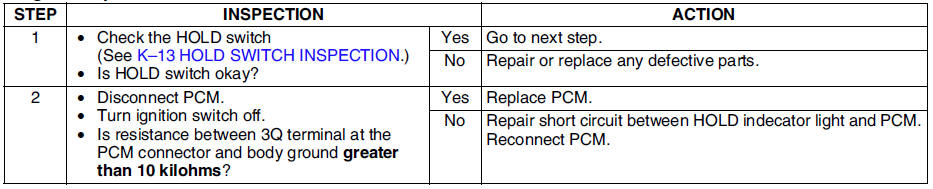
 No.27 hold indicator light does not illuminate when hold switch is turned to
on
No.27 hold indicator light does not illuminate when hold switch is turned to
on
Diagnostic procedure
...

Other materials:
Mazda 6 Service Manual: Rear center seat belt removal/installation
Caution
The ELR has a spring that will unwind if the retractor's cover is
removed. The spring cannot be rewound by hand. If this occurs, the ELR will
not work properly. Therefore, do not disassemble the retractor.
4SD
1. Fold the rear seat back.
2. Remove the rear package trim.
3. Re ...
Mazda 6 Service Manual: Refrigerant lines removal/installation
1. Remove the battery.
2. Discharge the refrigerant from the system. (See RECOVERY.) (See CHARGING.)
3. Remove the washer tank. (L.H.D. only) (See WASHER TANK
REMOVAL/INSTALLATION.)
4. Remove the air cleaner cover, air cleaner element and air cleaner case.
(See INTAKE-AIR SYSTEM
REMOVAL/INST ...