
Mazda 6 Service Manual: No.2 in navigation mode, vehicle locator mark skips
Mazda 6 Service Manual / Body electrical system / Troubleshooting / No.2 in navigation mode, vehicle locator mark skips

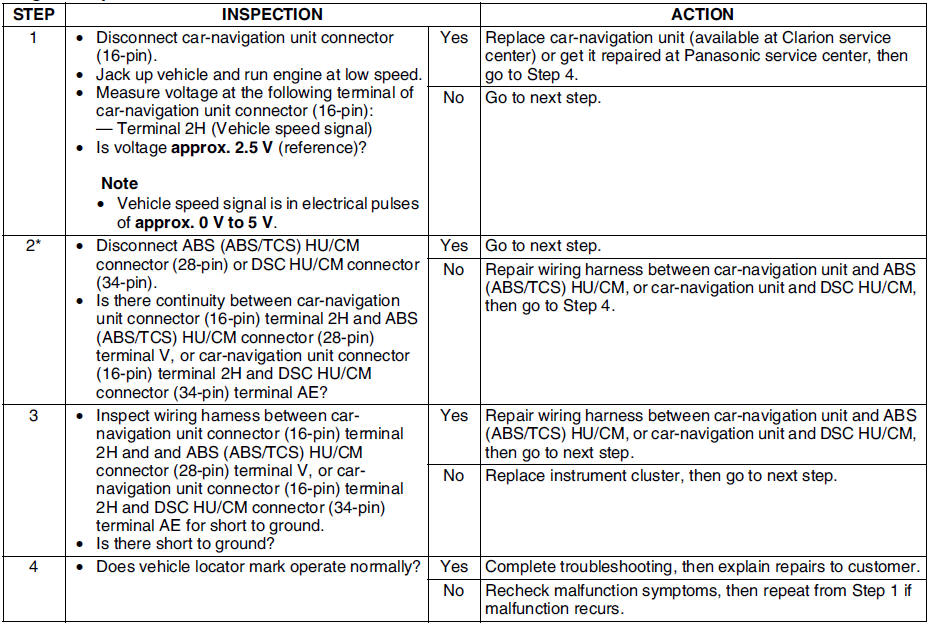
Diagnostic procedure
 No.1 while vehicle is in reverse, vehicle locator mark goes forward
When performing an asterisked (*) troubleshooting inspection, shake the
wiring harness and connectors while doing the inspection to discover whether
poor contact points are the cause of any i ...
 No.3 even when headlight switch is turned on, daytime screen does not change
to night time screen. (front and rear combination lights operate normally.)
No.3 even when headlight switch is turned on, daytime screen does not change
to night time screen. (front and rear combination lights operate normally.)
Diagnostic procedure
...
Other materials:
Mazda 6 Service Manual: Actuator cable removal
1. Remove the plug hole plate.
2. Remove the cover from the cruise actuator. (See CRUISE ACTUATOR
REMOVAL/INSTALLATION.)
3. Remove the installation nut and pull the cruise actuator toward you.
4. Move the throttle, and remove the end fitting of the actuator cable from
the throttle.
5. Sque ...
Mazda 6 Service Manual: Combine sensor inspection
Caution
Be careful and do not allow the lateral-G sensor to fall. If by
chance it is subjected to strong impact, replace it.
1. Connect the connector.
2. Turn ignition switch on, verify the voltage between terminals B and E
under the following conditions.
If not within the specifi ...
© 2016-2026 Copyright www.mazda6info.net