
Mazda 6 Service Manual: Rear door garnish removal
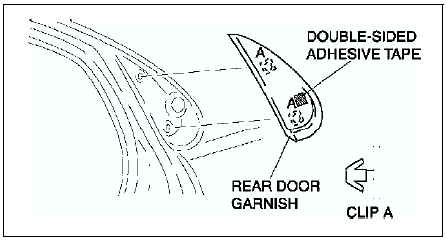
1. Disengage the door garnish clips using a fastener remover.
2. While cutting the double-sided adhesive tape using a screwdriver or a razor, separate the rear door garnish from the body.
Warning
- Using a razor with bare hands can cause injury. Always wear gloves when using a razor.
3. Remove the rear door garnish.
 Rear flap removal/installation
1. Remove the screws.
2. Remove the rear flap.
3. Install in the reverse order of removal. ...
 Rear door garnish installation
Note
Double-sided adhesive tape has already been attached to the new
rear door garnish.
Warning
Using a razor with bare hands can cause injury. Always wear gloves
when using a razor.
...
Other materials:
Mazda 6 Service Manual: New standards
Following is a comparison of the previous standard and the new standard.
#1 : Diagnostic trouble codes depend on the diagnostic test mode
#2 : Controlled by the PCM
#3 : In some models, there is a fuel pump relay that controls pump speed.
That relay is now called the fuel pump relay (s ...
Mazda 6 Service Manual: To Operate the System
The High Beam Control System (HBC) operates to switch the headlights automatically
between high and low beams after the ignition is switched ON and the headlight switch
is in the AUTO and high beam position.
The High Beam Control System (HBC) determines that it is dark based on the brightness
...