
Mazda 6 Service Manual: Troubleshooting index
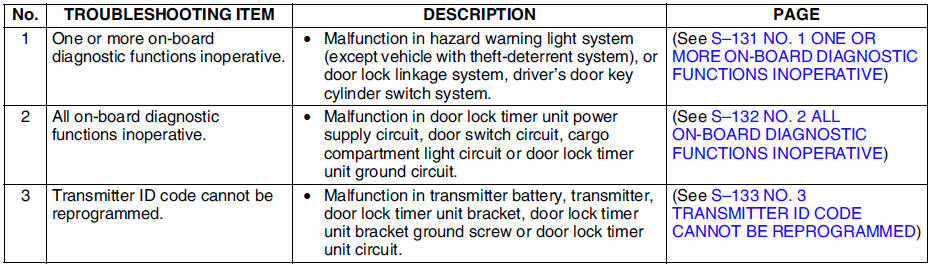

 No. 1 one or more on-board diagnostic functions inoperative
When performing an asterisked (*) troubleshooting inspection, shake the
wiring harness and connectors while doing the inspection to discover whether
poor contact points are the cause of any i ...
Other materials:
Mazda 6 Service Manual: Cup Holder
WARNING
Never use a cup holder to hold hot liquids while the vehicle is moving:
Using a cup holder to hold hot liquids while the vehicle is moving is dangerous.
If the contents spill, you could be scalded.
Do not put anything other than cups or drink cans in cup holders:
Putting objects othe ...
Mazda 6 Service Manual: Underbody Maintenance
Road chemicals and salt used for ice and snow removal and solvents used for dust
control may collect on the underbody. If not removed, they will speed up rusting
and deterioration of such underbody parts as fuel lines, frame, floor pan, and exhaust
system, even though these parts may be coated ...
© 2016-2026 Copyright www.mazda6info.net