
Mazda 6 Owners Manual: Active Driving Display (Some models)
WARNING
Always adjust the display brightness and position with the vehicle stopped:
Adjusting the display brightness and position while driving the vehicle is dangerous as doing so could distract your attention from the road ahead and lead to an accident.
CAUTION
- Do not try to adjust the angle or open/close the active driving display manually. Fingerprints on the display will make it difficult to view and using excessive force when operating it could cause damage.
- Do not place objects in the vicinity of the active driving display. The active driving display may not operate or any interference with its operation could cause damage.
- Do not place beverages near the active driving display. If water or other liquids are splashed on the active driving display, it could cause damage.
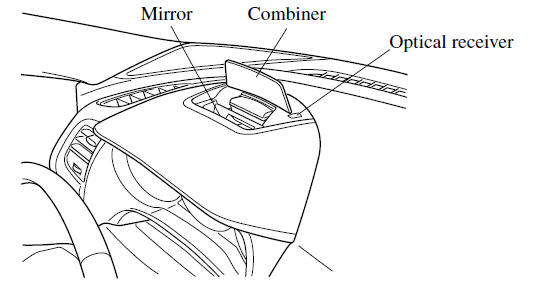
- Do not place objects above the active driving display screen or apply stickers to the combiner as they will cause interference.
- A sensor is integrated to control the display's luminosity. If the optical receiver is covered, the display's luminosity will lower making the display difficult to view.
- Do not allow intense light to hit the optical receiver. Otherwise, it could cause damage.
NOTE
- It may be difficult to view the display when wearing sunglasses. Take off your sunglasses or adjust the luminosity.
- If the battery terminal has been disconnected and re-connected or the battery voltage is low, the adjusted position may deviate.
- The display may be difficult to view or temporarily affected by weather conditions such as rain, snow, light, and temperature.
- If the audio system is removed, the active driving display cannot be operated.
The active driving display indicates the following information:
- Blind Spot Monitoring (BSM) Operation Conditions and Warnings Refer to Blind Spot Monitoring (BSM)
- Distance Recognition Support System (DRSS) Operation Conditions and Warnings Refer to Distance Recognition Support System (DRSS)
- Traffic Sign Recognition System (TSR) traffic signs and Warnings Refer to Traffic Sign Recognition System (TSR)
- Mazda Radar Cruise Control (MRCC) Operation Conditions and Warnings Refer to Mazda Radar Cruise Control (MRCC)
- Lane-keep Assist System (LAS) & Lane Departure Warning System (LDWS) Operation Conditions and Warnings Refer to Lane-keep Assist System (LAS) & Lane Departure Warning System (LDWS)
- Smart City Brake Support (SCBS) Warnings Refer to Smart City Brake Support (SCBS)
- Smart Brake Support (SBS) Operation Conditions and Warnings Refer to Smart Brake Support (SBS)
- Cruise Control Operation Conditions Refer to Cruise Control
- Navigation Guidance (vehicles with navigation system)
- Speed limit indicator (vehicles with navigation system)
- Vehicle Speed
Each setting/adjustment for the active driving display can be performed on the center display.
1. Select the  icon on the home screen and
display the Settings screen.
2. Select the AD-Disp tab.
3. Select the desired item and perform the setting/adjustment.
- Method for adjusting screen brightness (automatically/manually)
- Screen brightness initial settings (automatic adjustment is selected)
- Screen brightness adjustment (manual adjustment is selected)
- Display position of active driving display (display height)
- The combination of street name display, lane guidance, and turn by turn (TBT) can be changed. (navigation guidance)
- Active driving display ON/OFF
(indication)
- Reset settings (reset)
NOTE
The desired driving position (display position, brightness level, display information) can be called up after programming the position.
 Warning (Display Indication)
A message is displayed to notify the user of the system operation status and
malfunctions or abnormalities.
If the warning light turns on/flashes simultaneously or a symbol is indicated
in the di ...
 Warning/Indicator Lights
Instrument Cluster varies depending on model and specifications.
Instrument Cluster
...
Other materials:
Mazda 6 Owners Manual: Overheating
If the high engine coolant temperature warning light turns on, the vehicle loses
power, or you hear a loud knocking or pinging noise, the engine is probably too
hot.
WARNING
Pull over to a safe location,
then switch the ignition off and make sure the fan is not running before attempting
t ...
Mazda 6 Owners Manual: Oil filter
OIL FILTER REPLACEMENT
For Europe (LF and L3 engine models)
Caution
To avoid damage to the oil filter, use only specified oil filter.
1. Remove the oil filter drain plug.
2. Untighten the oil filter cover for 2 turns and drain the engine oil.
Note
Oil could be easily drained when th ...