
Mazda 6 Service Manual: B-pillar lower trim removal/installation
1. Remove the front scuff plate.
2. Remove the rear scuff plate.
3. Pull the area marked A, then remove one side of the B-pillar lower trim.
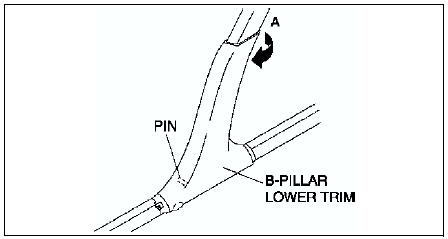
4. Pull the B-pillar lower trim, then remove the pin from the body.
5. Remove the B-pillar lower trim.
6. Install in the reverse order of removal.
 A-pillar trim installation
1. Cut A-pillar trim tab A to the same length as tab B.
2. Install clip B to the A-pillar trim.
3. Install the A-pillar trim by tapping the clip into the body. ...
 B-pillar upper trim removal/installation
1. Remove the upper anchor of the front seat belt.
2. Remove the B-pillar lower trim.
3. Turn the seaming welt over.
4. Pull the B-pillar upper trim toward you, then disengage, clip B, and pin C ...
Other materials:
Mazda 6 Service Manual: Clock spring removal/installation
1. Disconnect the negative battery cable.
2. Remove the driver-side air bag module. (See DRIVER-SIDE AIR BAG MODULE
REMOVAL/INSTALLATION.)
3. Remove the steering wheel. (See STEERING WHEEL AND COLUMN
REMOVAL/INSTALLATION.)
4. Remove the column cover.
5. Remove in the order indicated in the t ...
Mazda 6 Service Manual: Steering wheel and column removal/installation
Warning
Handling the air bag module improperly can accidentally deploy the
air bag module, which may seriously injure you. Read AIR BAG SYSTEM WARNINGS
before handling the air bag module. (See SERVICE WARNINGS.)
1. Remove in the order indicated in the table.
2. Install in the reverse o ...