
Mazda 6 Service Manual: Basic inspection
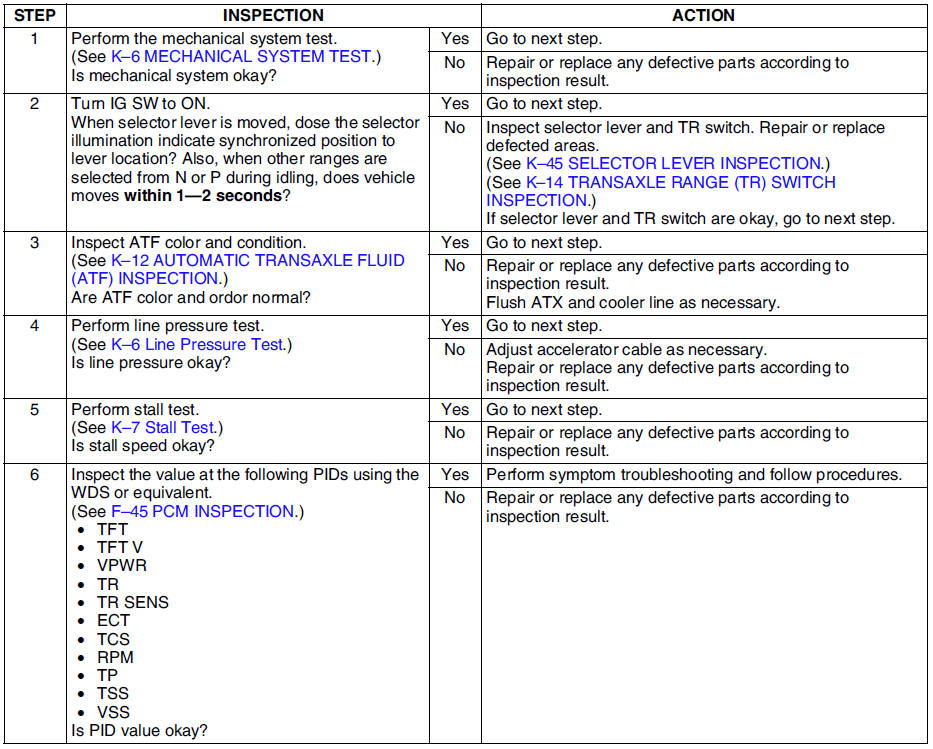
 Foreword
Refer to Section GI and thoroughly read and understand the basic flow of
troubleshooting in order to properly perform the procedures.
...
 Symptom troubleshooting item table
Use the chart below to verify the symptoms of the trouble in order to
diagnose the appropriate area.
...
Other materials:
Mazda 6 Service Manual: Front map light removal/installation
1. Disconnect the negative battery cable.
2. Remove in the order indicated in the table.
3. Install in the reverse order of removal.
Front Map Light Removal Note
1. Insert a tape-wrapped flathead screwdriver into the gap between the
headliner and the front map light.
2. Push the hooks to ...
Mazda 6 Service Manual: Call Interrupt
A call can be interrupted to receive an incoming call from a third party.
When is selected or the pickup
button on the steering wheel is pressed, the current call is held and the system
switches to the new incoming call.
When is selected, the current
call is ended and the system switches t ...
© 2016-2026 Copyright www.mazda6info.net