
Mazda 6 Service Manual: Combination switch removal/installation
1. Disconnect the negative battery cable.
2. Remove the driver-side air bag module. (See DRIVER-SIDE AIR BAG MODULE REMOVAL/INSTALLATION.)
3. Remove the steering wheel. (See STEERING WHEEL AND COLUMN REMOVAL/INSTALLATION.)
4. Remove the column cover. (See COLUMN COVER REMOVAL/INSTALLATION)
5. Remove the clock spring. (without DSC) (See CLOCK SPRING REMOVAL/INSTALLATION.)
6. Remove in the order indicated in the table.
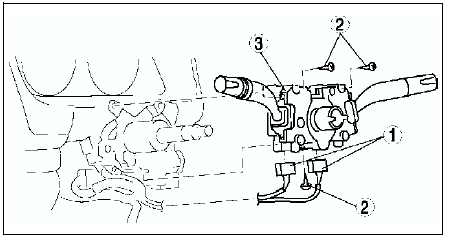

7. Install in the reverse order of removal.
 License plate light removal/installation
1. Disconnect the negative battery cable.
2. Remove the rear finisher. (See REAR FINISHER REMOVAL/INSTALLATION)
3. Remove in the order indicated in the table.
4. Install in the reverse order of ...
 Combination switch disassembly/assembly
1. Disassemble in the order indicated in the table.
2. Assemble in the reverse order of disassembly.
...
Other materials:
Mazda 6 Service Manual: Instrument cluster configuration
1. Connect the SST (WDS or equivalent) to the DLC-2.
2. Input vehicle information following the directions on the screen.
3. Select Module programming.
4. Select Programmable module installation.
5. Select the following items and perform procedures according to directions
on the screen.
...
Mazda 6 Service Manual: Exhaust system
EXHAUST SYSTEM INSPECTION
Start the engine and inspect each exhaust system component for exhaust gas
leakage.
If leakage is found, repair or replace as necessary.
EXHAUST SYSTEM REMOVAL/INSTALLATION
Warning
When the engine and exhaust system are hot, they can badly burn.
Turn off t ...