
Mazda 6 Service Manual: Front door speaker removal/installation
1. Disconnect the negative battery cable.
2. Remove the front door trim.
3. Remove in the order indicated in the table.
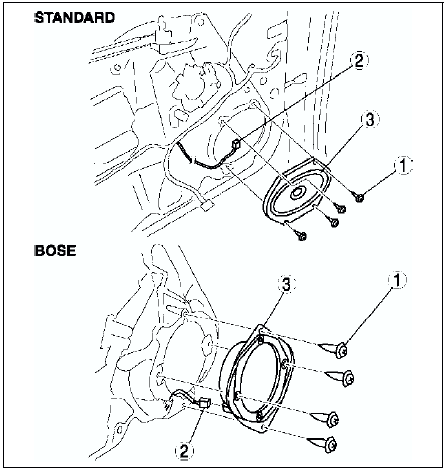
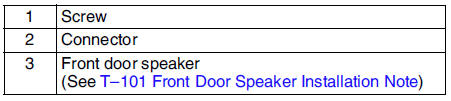
4. Install in the reverse order of removal.
Front Door Speaker Installation Note
Attach the speaker with the wiring harness placed in the groove of the door unit panel.
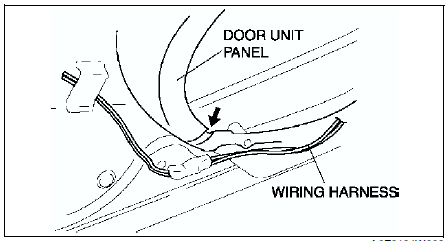
Caution
- If the speaker is attached with the harness placed outside of the groove, the wiring harness might be broken.
 Audio amplifier removal/installation
1. Disconnect the negative battery cable.
2. Remove in the order indicated in the table.
3. Install in the reverse order of removal. ...
 Front door speaker inspection
1. Inspect for resistance between the front door speaker terminals using an
ohmmeter.
If not as specified, replace the front door speaker.
2. To verify that the front door speaker outputs ...
Other materials:
Mazda 6 Service Manual: Filament inspection
1. Turn the ignition switch to ON position.
2. Turn the rear window defroster switch on.
Caution
Directly touching the rear window defroster filament with the lead
of the voltmeter will damage it. Wrap aluminum foil around the end of the
lead and test the filament by touching it with the ...
Mazda 6 Service Manual: Variable tumble control system (vtcs) shutter valve actuator inspection
1. Remove the air hose. (See INTAKE-AIR SYSTEM REMOVAL/INSTALLATION.)
2. Disconnect the vacuum hose from the VTCS shutter valve actuator.
3. Connect a vacuum pump to the VTCS shutter valve actuator.
4. Apply vacuum and verify that the rod moves.
If the rod dose not move, replace the intake ...