
Mazda 6 Service Manual: Headlight zeroset
Note
- When the configuration is not set for the auto leveling control unit, headlight zeroset cannot be executed.
1. Adjust the tire air pressure to the specification.
2. Position the unloaded vehicle on a flat, level surface.
3. Connect the SST (WDS or equivalent) to the DLC-2.
4. Turn the ignition switch to ON position.
5. Turn on the headlights (low-beam).
6. Input the vehicle information following the directions on the screen.
7. Confirm that the WDS or equivalent identifies the vehicle, and select Datelogger.
8. After the screen appears, select LHID under Modules from the cascading menu.
9. After the next screen appears, select CALAXLSN#.
10. On the graphic display that appears, press the icon near the top right of the screen indicated by a 1 in the figure.
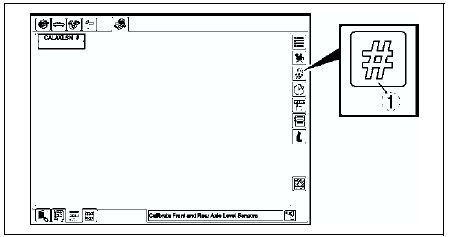
11. After the next screen appears, press the icon indicated by a 2 in the figure.
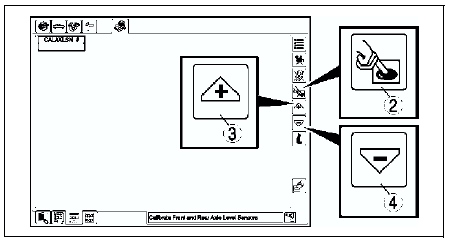
12. After pressing the icon indicated by the 2, press the icon indicated by a 3 or 4 in the figure to execute the zeroset setting.
Note
- Pressing an icon indicated by 3 or 4 once will execute the headlight zeroset setting.
13. After executing the headlight zeroset setting, perform an on-board diagnostic test and verify that no DTCs are displayed.
14. Perform the headlight aiming adjustment. (See HEADLIGHT AIMING)
 Auto leveling control unit configuration
1. Connect the SST (WDS or equivalent) to the DLC-2.
2. Input vehicle information following the directions on the screen.
3. Select Module programming.
4. Select Programmable module installation. ...
 Front auto leveling sensor removal/installation
1. Disconnect the negative battery cable.
2. Jack up the vehicle and remove the wheel and tire.
3. Remove in the order indicated in the table.
4. Install in the reverse order of removal.
5. Ad ...
Other materials:
Mazda 6 Service Manual: General procedures
PRECAUTION (FRONT AND REAR AXLE)
Wheel and Tire Removal/Installation
1. The removal and installation procedures for the wheels and tires are not
mentioned in this section. When a wheel is removed, tighten it to 88-118 N·m
{9.0-12.0 kgf·m, 65.0-87.0 ft·lbf}
Brake Line Disconnection/Connecti ...
Mazda 6 Service Manual: If You Must Use the Front Seat for Children
If you cannot put all children in the rear seat, at least put the smallest children
in the rear and be sure the largest child up front uses the shoulder belt over the
shoulder.
NEVER put a rear-facing child-restraint system on the front passenger seat whether
your vehicle is equipped with a o ...