
Mazda 6 Service Manual: Panel light control switch inspection
1. Connect the connector to the panel light control switch.
2. Connect the negative battery cable.
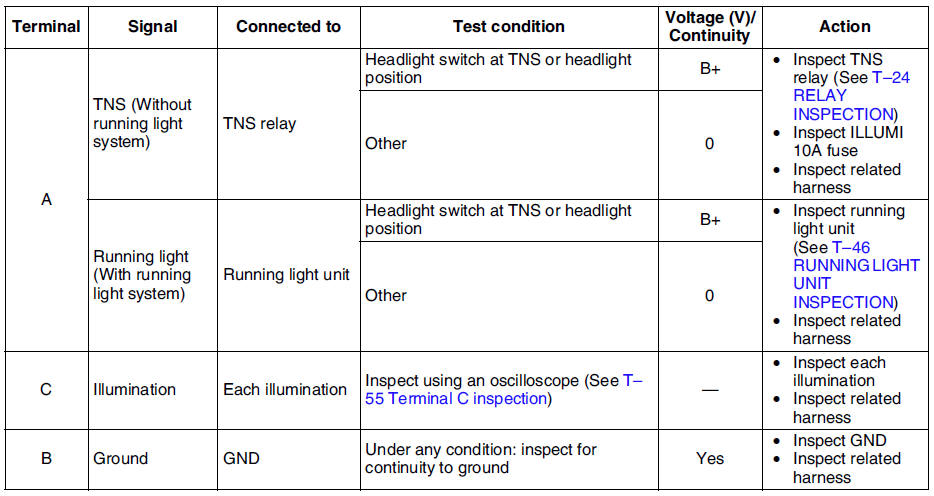
3. Measure the voltage at the panel light control switch using voltmeter.
- When inspecting terminal B for continuity, disconnect the panel light control switch connector.
4. If the value are not as specified in the Terminal Voltage List (Reference), inspect the parts under Action and related wiring harnesses.
5. If the system does not work properly even though the parts or related wiring harnesses do not have any malfunction, replace the panel light control switch.
Terminal Voltage Table (Reference)

Terminal C inspection
1. Measure the wave pattern of the terminal C on the panel light control switch using an oscilloscope.
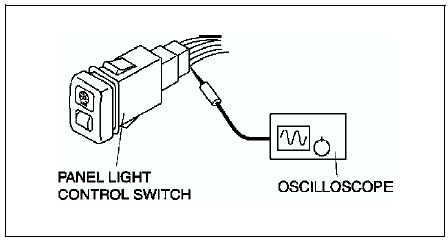
2. Set the headlight switch to either the TNS or headlight position.
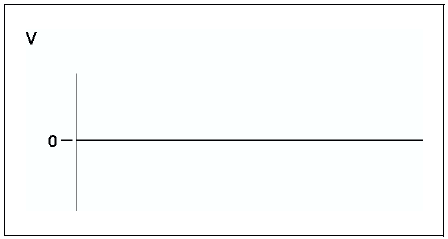
3. Set the panel light control switch to the brightest position.
4. Verify that the pattern on the screen is as shown in the figure.
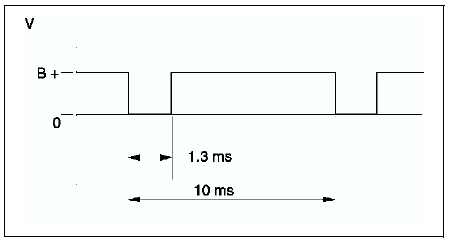
5. Verify that the pattern on the screen matches the pattern shown in the figure as the panel light control switch is gradually turned to the darkest position.
 Panel light control switch removal/installation
1. Disconnect the negative battery cable.
2. Remove in the order indicated in the table.
3. Install in the reverse order of removal.
Panel Light Control Switch Removal Note
1. Insert your hand ...
 Wiper and washer
...
Other materials:
Mazda 6 Service Manual: Flasher unit inspection
1. Connect the connector to the flasher unit.
2. Connect the negative battery cable.
3. Measure the voltage at the flasher unit using voltmeter.
When inspecting terminal F for continuity, disconnect the flasher unit connector.
4. If the value are not as specified in the Terminal Voltag ...
Mazda 6 Service Manual: Operational Range
The system operates only when the driver is in the vehicle or within operational
range while the key is being carried.
Starting the Engine
NOTE
Starting the engine may be possible even if the key is outside of the
vehicle and extremely close to a door and window, however, always start the ...