
Mazda 6 Service Manual: Pcm configuration
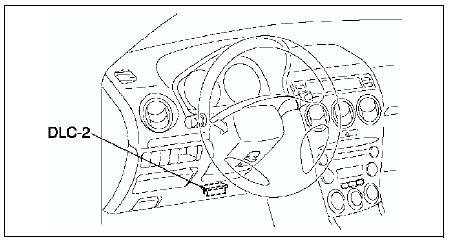
1. Connect the WDS to DLC-2.
2. Set up the WDS (including the vehicle recognition.)
3. Select Module programming.
4. Select Programmable module installation.
5. Select PCM and perform procedures according to directions on the WDS screen.
Note
- If PCM CONFIGURATION is successful, the PCM stores the DTC P0602 and illuminates the MIL. (System is normal.) Clear the DTC P0602 using WDS or equivalent after PCM CONFIGURATION.
Note
- MIL goes off after three drive cycles with no failure. (DTCs remain in PCM.)
6. Retrieve DTCs by the WDS or equivalent, then verify that there in no DTC present.
- If DTC is present, perform applicable DTC inspection.
 Pcm inspection
Note
PIDs for the following parts are not available on this model. Go
to the appropriate part inspection page.
- CMP sensor (See CAMSHAFT POSITION (CMP) SENSOR INSPECTION.)
- Main relay ...
 Intake air temperature (iat) sensor inspection
Resistance Inspection
Note
Perform the following inspection only when directed.
1. Disconnect MAF/IAT sensor.
2. Measure the resistance between the MAF/IAT sensor terminals D and E using
an ...
Other materials:
Mazda 6 Service Manual: Manually Shifting Up
You can shift gears up by operating the selector lever or the steering shift
switches (some models).
M1 → M2 → M3 → M4 → M5 → M6
Using selector lever
To shift up to a higher gear, tap the selector lever back (+) once.
Using steering shift switch (some models)
To ...
Mazda 6 Service Manual: Automatic transaxle fluid (atf) replacement
Warning
When the transaxle and ATF are hot, they can badly burn you. Turn
off the engine and wait until they are cool before changing the ATF.
1. Remove the oil dipstick.
2. Remove the oil drain plug and washer.
3. Drain the ATF into a container.
4. Install a new washer and the drain ...