
Mazda 6 Service Manual: Rear door garnish removal
1. Disengage the door garnish clips using a fastener remover.
2. While cutting the double-sided adhesive tape using a screwdriver or a razor, separate the rear door garnish from the body.
Warning
- Using a razor with bare hands can cause injury. Always wear gloves when using a razor.
3. Remove the rear door garnish.
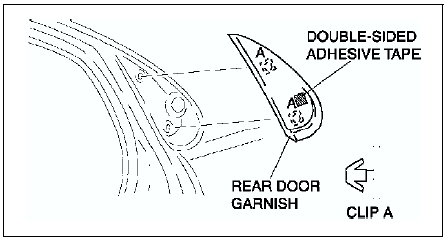
 Rear flap removal/installation
1. Remove the screws.
2. Remove the rear flap.
3. Install in the reverse order of removal. ...
 Rear door garnish installation
Note
Double-sided adhesive tape has already been attached to the new
rear door garnish.
Warning
Using a razor with bare hands can cause injury. Always wear gloves
when using a razor.
...
Other materials:
Mazda 6 Service Manual: Connectors
Data link connector
Insert the probe into the terminal when connecting a jumper wire to the
data link connector.
Caution
Inserting a jumper wire probe into the data link connector
terminal may damage the terminal.
Disconnecting connectors
When disconnecting connector, grasp ...
Mazda 6 Service Manual: Parking brake (lever type) adjustment
1. Start the engine and depress the brake pedal several times.
2. Stop the engine.
3. Remove the ashtray behind the center console.
4. Turn the adjusting nut as shown in the figure.
5. After adjustment, inspect the following points:
(1) Turn the ignition switch to ON, pull the parking brak ...