
Mazda 6 Service Manual: Rear flap removal/installation
1. Remove the screws.
2. Remove the rear flap.
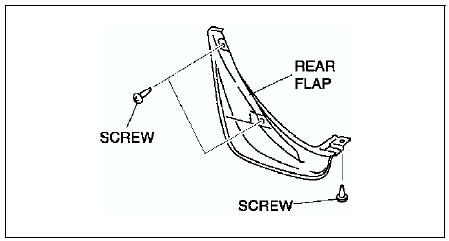
3. Install in the reverse order of removal.
 Front flap removal/installation
1. Remove the screws and fastner.
2. Remove the front flap.
3. Install in the reverse order of removal. ...
 Rear door garnish removal
1. Disengage the door garnish clips using a fastener remover.
2. While cutting the double-sided adhesive tape using a screwdriver or a
razor, separate the rear door garnish from the body.
Warning
...
Other materials:
Mazda 6 Service Manual: Rear door glass removal/installation
1. Fully down the rear door glass.
2. Remove the rear door trim.
3. Remove the hole cover.
4. Pull up the rear door weatherstrip and remove the screw.
5. Remove the bolt.
6. Remove the glass run channel from the rear door glass guide.
7. Lift the rear door glass to the position where the rea ...
Mazda 6 Service Manual: Coil removal/installation
Note
Do not remove the coil unless you are replacing it.
When only the coil is replaced, the immobilizer system reprogram
procedure is not necessary.
1. Disconnect the negative battery cable.
2. Remove the column cover.
3. Remove in the order indicated in the table.
4. Install in ...