
Mazda 6 Service Manual: Side protector removal
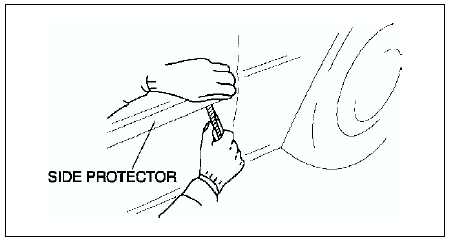
1. Pry the side protector end 20-30 mm {0.8-1.1 in}
using a flathead screwdriver or a razor.
Warning
- Using a razor with bare hands can cause injury. Always wear gloves when using a razor.
Note
- The side protector is installed with double-sided adhesive tape. If the side protector is difficult to remove, soften the double-sided adhesive tape using a hot air blower.
2. Pull the side protector toward you, then remove it.
 Rear door garnish installation
Note
Double-sided adhesive tape has already been attached to the new
rear door garnish.
Warning
Using a razor with bare hands can cause injury. Always wear gloves
when using a razor.
...
 Side protector installation
1. Remove the adhesive remaining on the side protector (if it will be reused)
and the body using a razor.
2. Remove any grease or dirt from the adhesion surface of the side protector
(if it will ...
Other materials:
Mazda 6 Service Manual: Oil leakage inspection
Use either of the following procedures to identify the type of oil that
is leaking:
Using UV Light (Black Light)
1. Remove on the engine or transaxle.
Note
Referring to the fluorescent dye instruction manual, mix the
specified amount of dye into the engine oil or ATF (or transaxle ...
Mazda 6 Service Manual: Front oil seal
FRONT OIL SEAL REPLACEMENT
1. Disconnect the negative battery cable.
2. Remove the spark plugs. (See SPARK PLUG REMOVAL/INSTALLATION.)
3. Remove the Cylinder head cover. (See Cylinder Head Cover Installation
Note.)
4. Remove the drive belt. (See DRIVE BELT REPLACEMENT.)
5. Remove the front dr ...