
Mazda 6 Service Manual: Bumper reinforcement removal/installation
1. Disconnect the negative battery cable.
2. Remove the front bumper. (See FRONT BUMPER REMOVAL/INSTALLATION.)
3. Remove the headlight. (See FRONT COMBINATION LIGHT REMOVAL/INSTALLATION.)
4. Suport the radiator and the condenser using the wire.
5. Remove the bolt.
6. Remove the bumper reinforcement.
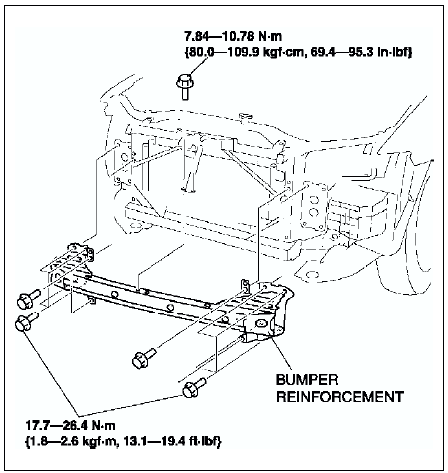
7. Install in the reverse order of removal.
 Front bumper disassembly/assembly
1. Disassemble in the order indicated in the table.
2. Assemble in the reverse order of disassembly. ...
 Rear bumper removal/installation
1. Disconnect the negative battery cable.
2. Remove the rear combination light.
3. Remove in the order indicated in the table.
4. Install in the reverse order of removal.
Rear Bumper Removal N ...
Other materials:
Mazda 6 Service Manual: To Temporarily Cancel
To temporarily cancel the system, use one of these methods:
Slightly depress the brake pedal.
(Manual transaxle) Depress the clutch pedal.
Press the OFF/CANCEL switch.
If the RESUME/ switch is
pressed when the vehicle speed is 25 km/h (16 mph) or higher, the system reverts
to the prev ...
Mazda 6 Service Manual: Antilock Brake System (ABS)
The ABS control unit continuously monitors the speed of each wheel. If one wheel
is about to lock up, the ABS responds by automatically releasing and reapplying
that wheel's brake.
The driver will feel a slight vibration in the brake pedal and may hear a chattering
noise from the brake system ...