
Mazda 6 Service Manual: Diagnostic monitoring test results
Mazda 6 Service Manual / Fuel and emission control systems / On-board diagnostic / Diagnostic monitoring test results
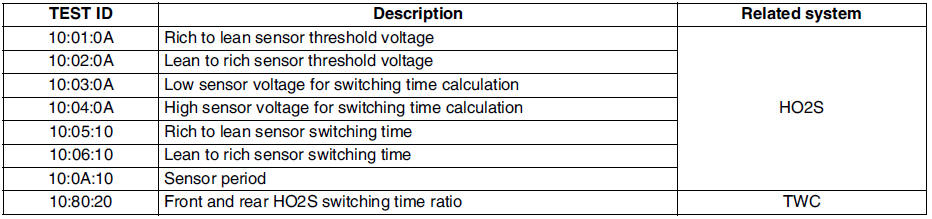
- The purpose of this test mode is to confirm the result of OBD monitor diagnostic test results. The result values stored when particular monitor is completed are displayed. If the monitor is not completed, initial value is displayed.
 Obd drive mode
Performing the Drive Mode inspects the OBD system for proper operation.
The Drive Mode must be performed to ensure that no additional DTCs are
present.
During Drive Mode, the following syst ...

Other materials:
Mazda 6 Service Manual: Egr valve removal/installation
1. Disconnect the negative battery cable.
2. Disconnect the EGR valve connector.
3. Remove in the order indicated in the table.
4. Install in the reverse order of removal.
Water Hose Removal Note
Drain the engine coolant. (See ENGINE COOLANT REPLACEMENT.)
EGR Valve Removal Note
1. Re ...
Mazda 6 Service Manual: Transaxle range (tr) switch inspection
Operating Inspection
1. Verify that the starter operates only when the ignition switch is at the
START position with the selector lever in P or N position.
If not as specified, adjust the TR switch.
2. Verify that the back-up lights illuminate when shifted to R position with
the ignition ...
© 2016-2026 Copyright www.mazda6info.net