
Mazda 6 Service Manual: Dtc 13

Diagnostic Procedure
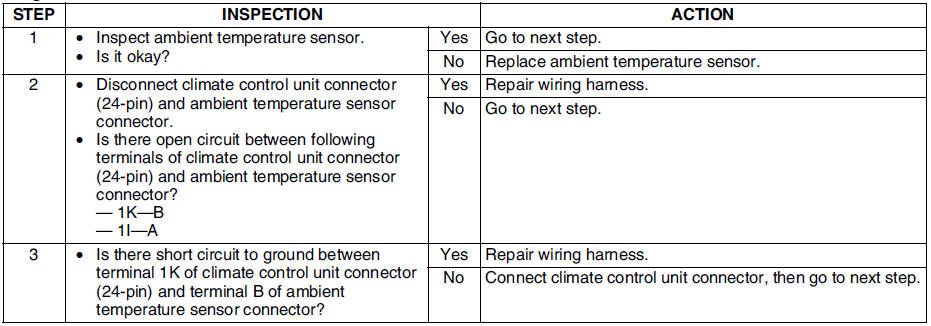

 Dtc 12
Diagnostic Procedure
...
 Dtc 14
Diagnostic Procedure
...
Other materials:
Mazda 6 Service Manual: New standards
Following is a comparison of the previous standard and the new standard.
#1 : Diagnostic trouble codes depend on the diagnostic test mode
#2 : Controlled by the PCM
#3 : In some models, there is a fuel pump relay that controls pump speed.
That relay is now called the fuel pump relay (s ...
Mazda 6 Service Manual: Windshield wiper motor inspection
L.H.D.
1. Disconnect the windshield wiper motor connector.
2. Connect battery positive voltage to terminal E or D and ground to terminal
B, and inspect the operation of the windshield wiper motor as indicated below.
3. Disconnect battery positive voltage from terminal E of the motor while t ...
© 2016-2026 Copyright www.mazda6info.net