
Mazda 6 Service Manual: Front brake (disc) removal/installation
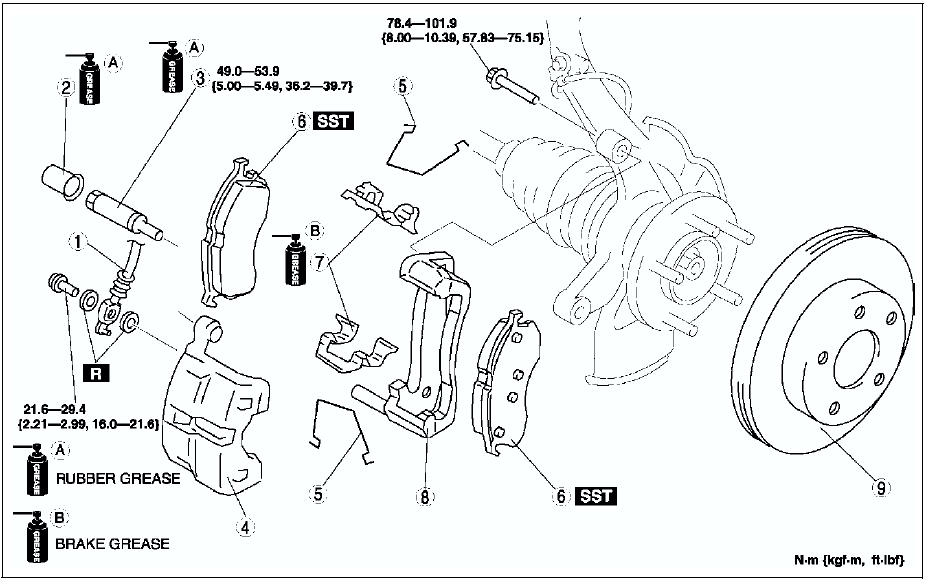
1. Remove in the order indicated in the table.
2. Install in the reverse order of removal.
3. After installation, depress the pedal a few times, rotate the wheel by hand, and verify that the brake does not drag.

Disc Plate Removal Note
Mark the wheel hub bolt and disc plate before removal for reference during installation.
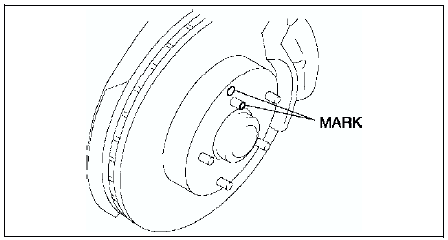
Disc Plate Installation Note
1. Remove any rust or grime on the contact face of the disc plate and wheel hub.
2. Install the disc plate and align the marks made before removal.
Disc Pad Installation Note
1. Push the piston fully inward using the SST
.
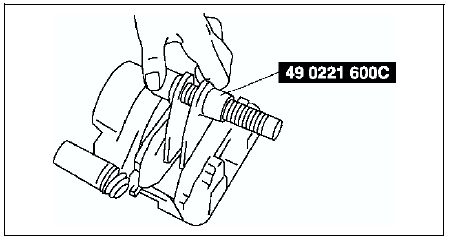
2. Install the disc pad.
 Front brake (disc) inspection
Brake Judder Repair Hint
Description
Brake judder concern has the following 3 characteristics:
Steering wheel vibration
Steering wheel vibrates in the direction of its rotation. This characteristi ...
 Disc pad (front) replacement
1. Remove in the order indicated in the table.
2. Install in the reverse order of removal.
...
Other materials:
Mazda 6 Service Manual: Door lock timer unit inspection
1. Measure the voltage at the door lock timer unit terminals (other than
terminal 1E and 2W) as indicated below.
If not as specified, inspect the parts listed under Action.
2. Disconnect the negative battery cable.
3. Disconnect the door lock timer unit connector and inspect for continuity ...
Mazda 6 Service Manual: Front seat removal/installation
Warning
Handling the front seat (side air bag) improperly can accidentally
deploy the side air bag, which may seriously injure you. Read AIR BAG SYSTEM
SERVICE WARNINGS before handling the front seat. (See SERVICE WARNINGS.)
1. Turn the ignition switch to the LOCK position.
2. Disconne ...