
Mazda 6 Owners Manual: Indicators
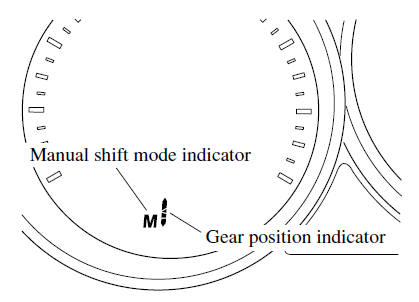
Manual shift mode indication
In manual shift mode, the “M” of the shift position indication in the instrument panel illuminates.
Gear position indication
The numeral for the selected gear illuminates.
NOTE
- If the gears cannot be shifted down when driving at higher speeds, the gear position indication will flash twice to signal that the gears cannot be shifted down (to protect the transaxle).
- If the automatic transaxle fluid (ATF) temperature becomes too high, there is the possibility that the transaxle will switch to automatic shift mode, canceling manual shift mode and turning off the gear position indication illumination. This is a normal function to protect the AT. After the ATF temperature has decreased, the gear position indication illumination turns back on and driving in manual shift mode is restored.
 Manual Shift Mode
The manual shift mode gives you the feel of driving a manual transaxle vehicle
by allowing you to operate the selector lever manually. This allows you to control
engine rpm and torque to the drive ...
 Manually Shifting Up
You can shift gears up by operating the selector lever or the steering shift
switches (some models).
M1 → M2 → M3 → M4 → M5 → M6
Using selector lever
To shift up to ...
Other materials:
Mazda 6 Owners Manual: Oil control valve (ocv) removal/installation
L3
1. Disconnect the negative battery cable.
2. Remove the plug hole plate.
3. Remove the high-tension lead. (See HIGH-TENSION LEAD
REMOVAL/INSTALLATION.)
4. Remove the oil control valve (OCV) connector.
5. Remove the ventilation hose.
6. Remove the cylinder head cover. (See Cylinder Head Co ...
Mazda 6 Owners Manual: Power brake unit removal/installation
1. Remove the master cylinder. (See MASTER CYLINDER REMOVAL/INSTALLATION.)
2. Remove the wiper arm. (See WINDSHIELD WIPER ARM AND BLADE
REMOVAL/INSTALLATION.)
3. Remove the cowl grille. (See COWL GRILLE REMOVAL/INSTALLATION.)
4. Remove the wiper motor. (See WINDSHIELD WIPER MOTOR REMOVAL/INSTAL ...