
Mazda 6 Owners Manual: KEY Warning Light (Some models)
Take the appropriate action and verify that the warning light turns off.
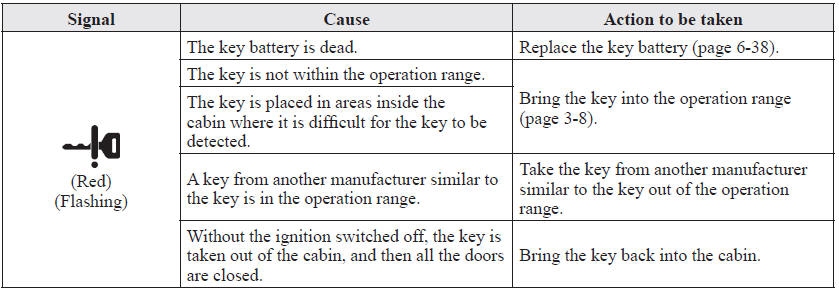
 Taking Action
Take the appropriate action and verify that the warning light turns off.
...
 Message Indicated on Display
If a message is displayed in the center display, take appropriate action (in
a calm manner) according to the displayed message.
...
Other materials:
Mazda 6 Owners Manual: Valve clearance adjustment
1. Disconnect the negative battery cable.
2. Remove the tire (RH).
3. Remove the splash shield (RH).
4. Remove the spark plugs. (See SPARK PLUG REMOVAL/INSTALLATION.)
5. Remove the high-tension lead.
6. Remove the oil control valve (OCV) connector.
7. Remove the ventilation hose.
8. Remove th ...
Mazda 6 Owners Manual: Climate control unit installation
1. Pass each wire through the following routes then connect to A/C unit.
(Manual air conditioner)
2. Connect the climate control unit connectors. (Manual air conditioner)
3. Install the climate control unit to the center panel. (Full-auto air
conditioner)
4. Install the center panel.
5. Ad ...