
Mazda 6 Service Manual: No.7 slow return to idle
Mazda 6 Service Manual / Fuel and emission control systems / Troubleshooting / No.7 slow return to idle

Diagnostic procedure
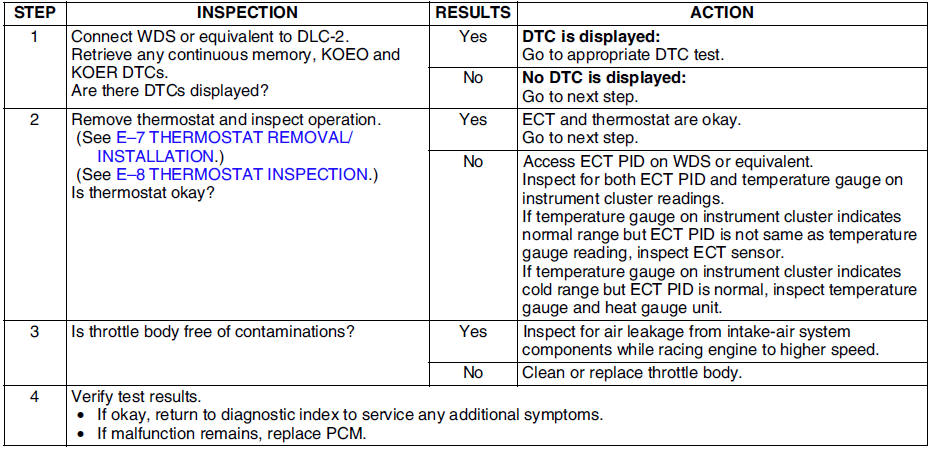
 No.6 cranks normally but will not start
Diagnostic procedure
...
 No.8 engine runs rough/rolling idle
Diagnostic procedure
...
Other materials:
Mazda 6 Service Manual: Hill Launch Assist (HLA)
Hill Launch Assist (HLA) is a function which assists the driver in accelerating
from a stop while on a slope. When the driver releases the brake pedal and depresses
the accelerator pedal while on a slope, the function prevents the vehicle from rolling.
The braking force is maintained automatic ...
Mazda 6 Service Manual: Advanced Keyless Entry System
WARNING
Radio waves from the key may affect medical devices such as pacemakers:
Before using the key near people who use medical devices, ask the medical device
manufacturer or your physician if radio waves from the key will affect the device.
The advanced keyless function allows you to lock/u ...
© 2016-2026 Copyright www.mazda6info.net