
Mazda 6 Service Manual: Side protector installation
1. Remove the adhesive remaining on the side protector (if it will be reused) and the body using a razor.
2. Remove any grease or dirt from the adhesion surface of the side protector (if it will be reused) and the body.
3. Attach double-sided adhesive tape to the side protector as shown (if it will be reused).
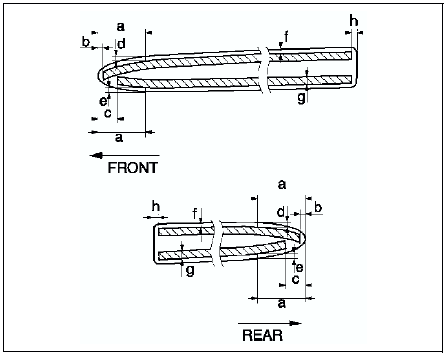
Clearancea: 30.0 mm {1.18 in}b: 3.0 mm {0.11 in}c: 12.0 mm {0.47 in}d: 3.0 mm {0.11 in}e: 3.0 mm {0.11 in}f: 1.0-3.0 mm {0.04-0.11 in}g: 5.0 mm {0.19 in}h: 2.0 mm {0.07 in}
4. Peel off the backing paper from the double-sided adhesive tape and attach the side protector onto the body as shown.
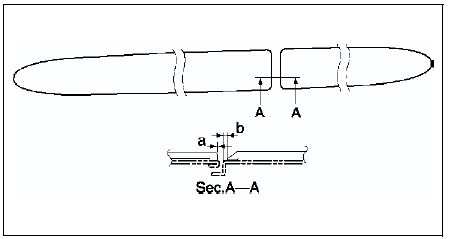
Clearance
a: 1.2-4.2 mm {0.05-0.16 in} b: 3.2-6.2 mm {0.13-0.24 in}
 Side protector removal
1. Pry the side protector end 20-30 mm {0.8-1.1 in} using a flathead
screwdriver or a razor.
Warning
Using a razor with bare hands can cause injury. Always wear gloves
when using a razor.
...
 Extractor chamber removal/installation
1. Remove the rear bumper. (See REAR BUMPER REMOVAL/INSTALLATION.)
2. Remove the left side trunk side trim.
3. Remove the screw.
4. Squeeze the clips with your fingers and remove the extractor cham ...
Other materials:
Mazda 6 Service Manual: Clock spring inspection
1. Remove the clock spring.
2. Inspect for continuity between the clock spring terminals using an
ohmmeter.
If not as specified, replace the clock spring.
Note
When the vehicle-side connector of clock spring is disconnected,
the terminals 1A,1B, 1C and 1D are shorted to prevent ...
Mazda 6 Service Manual: To Resume Cruising Speed at More Than 25 km/h (16 mph)
If some other method besides the OFF/ CANCEL switch was used to cancel cruising
speed (such as applying the brake pedal) and the system is still activated, the
most recent set speed will automatically resume when the RESUME/
switch is pressed.
If vehicle speed is below 25 km/h (16 mph), incre ...