
Mazda 6 Service Manual: Extractor chamber removal/installation
1. Remove the rear bumper. (See REAR BUMPER REMOVAL/INSTALLATION.)
2. Remove the left side trunk side trim.
3. Remove the screw.
4. Squeeze the clips with your fingers and remove the extractor chamber from the vehicle side.
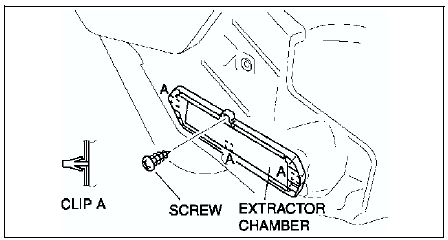
5. Install in the reverse order of removal.
 Side protector installation
1. Remove the adhesive remaining on the side protector (if it will be reused)
and the body using a razor.
2. Remove any grease or dirt from the adhesion surface of the side protector
(if it will ...
 Rear finisher removal/installation
1. Remove the trunk lid trim (4SD).
2. Remove the liftgate lower trim (5HB).
3. Remove the nuts.
4. Pull the rear finisher toward you, then disengage clip A from the body.
5. Install in the reve ...
Other materials:
Mazda 6 Service Manual: No.8 brake system warning light stays on more than 4 seconds with ignition
switch on
Diagnostic procedure
When performing an asterisked (*) troubleshooting inspection, shake the
wiring harness and connectors while doing the inspection to discover whether
poor contact points are the cause of any intermittent malfunction. If there
is a problem, check to make sure co ...
Mazda 6 Service Manual: After repair procedure
Caution
After repairing a malfunction, perform this procedure to verify that the
malfunction has been corrected.
When this procedure is carried out, be sure to drive the vehicle at lawful
speed and pay attention to the other vehicles.
1. Connect the WDS or equivalent to the DLC-2.
2. Turn th ...