
Mazda 6 Owners Manual: Applications
NOTE
Depending on the grade and specification, the screen display may differ.
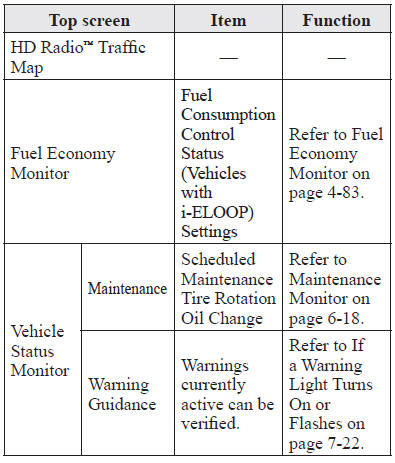
Select the  icon on the home screen
to display the Applications screen. The following information can be verified.
 Settings
NOTE
Depending on the grade and specification, the screen display may differ.
Select the icon on the home
screen and display the Settings screen.
Switch the tab and select the setting item you w ...

Other materials:
Mazda 6 Owners Manual: Condenser removal/installation
4SD
1. Disconnect the negative battery cable.
2. Remove the rear package trim.
3. Remove in the order indicated in the table.
4. Install in the reverse order of removal.
5HB
1. Disconnect the negative battery cable.
2. Remove the liftgate lower trim.
3. Remove in the order indicated in t ...
Mazda 6 Owners Manual: Ignition switch inspection
1. Disconnect the negative battery cable.
2. Remove the column cover. (See COLUMN COVER REMOVAL/INSTALLATION)
3. Disconnect the ignition switch connectors.
4. Inspect for continuity between the ignition switch terminals using an
ohmmeter.
If not as specified, replace the ignition switch.
...