
Mazda 6 Owners Manual: Audio Control Switch Operation
 Applications
NOTE
Depending on the grade and specification, the screen display may differ.
Select the icon on the home screen
to display the Applications screen. The following information can be verified.
...
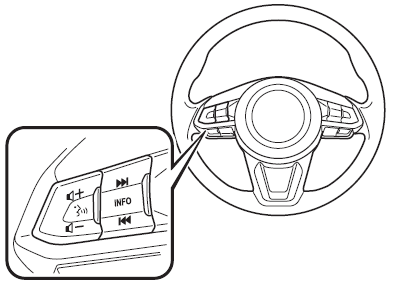
 Adjusting the Volume
To increase the volume, press up the volume switch (
).
To decrease the volume, press down the volume switch (
).
...
Other materials:
Mazda 6 Owners Manual: Vehicle Loading
WARNING
Do not tow a trailer with this vehicle: Towing a trailer with this
vehicle is dangerous because it has not been designed to tow a trailer and doing
so will affect the drive system which could result in vehicle damage.
This section will guide you in the proper loading of your vehicle, t ...
Mazda 6 Owners Manual: Rocking the Vehicle
WARNING
Do not spin the wheels at more than 56 km/h (35 mph), and do not allow
anyone to stand behind a wheel when pushing the vehicle: When the vehicle
is stuck, spinning the wheels at high speed is dangerous. The spinning tire could
overheat and explode. This could cause serious injuries.
...
© 2016-2026 Copyright www.mazda6info.net