
Mazda 6 Service Manual: Center box removal/installation
1. Disconnect the negative battery cable.
2. Remove the center panel module.
3. Remove the screws.
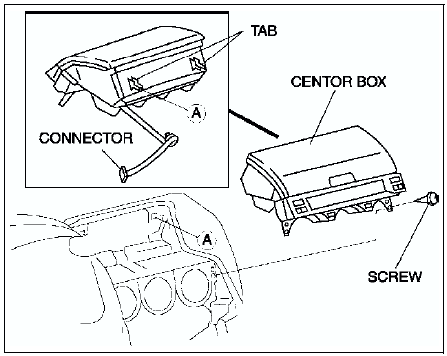
4. Pull the center box forward, then disengage the tabs
5. Disconnect the LDC unit connector.
6. Install in the reverse order of removal.
 Lower panel removal/installation
1. Remove the bonnet release lever.
2. Remove the screws.
3. Pull the lower panel toward you, then disengage clips A and tabs B from
the dashboard, and remove the lower panel.
4. Install in the ...
 Glove compartment removal/installation
1. Pull the stay damper to the direction shown in the figure. Then detach the
fit for the glove compartment from the stay damper.
2. Bend the stoppers inward to remove.
3. Turn the glove compa ...
Other materials:
Mazda 6 Service Manual: Electrical troubleshooting tools
Jumper wire
A jumper wire is used to create a temporary circuit. Connect the jumper
wire between the terminals of a circuit to bypass a switch.
Caution
Do not connect a jumper wire from the power source line to a body
ground. This may cause burning or other damage to wiring harnesse ...
Mazda 6 Service Manual: Oil pump
OIL PUMP REMOVAL/INSTALLATION
1. Disconnect the negative battery cable.
2. Drain the engine oil. (See ENGINE OIL REPLACEMENT.)
3. Remove the oil pan. (See OIL PAN REMOVAL/INSTALLATION.)
4. Remove in the order indicated in the table.
5. Install in the reverse order of removal.
6. Inspect the en ...