
Mazda 6 Service Manual: Glove compartment removal/installation
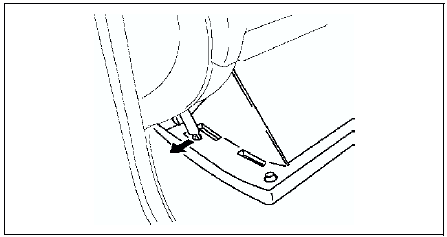
1. Pull the stay damper to the direction shown in the figure. Then detach the fit for the glove compartment from the stay damper.
2. Bend the stoppers inward to remove.
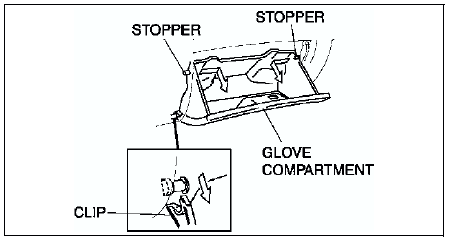
3. Turn the glove compartment downward and pull the clips to remove it.
4. Install in the reverse order of removal.
 Center box removal/installation
1. Disconnect the negative battery cable.
2. Remove the center panel module.
3. Remove the screws.
4. Pull the center box forward, then disengage the tabs
5. Disconnect the LDC unit connector.
...
 Console removal/installation
1. For MT vehicle, remove the shift lever knob.
2. Remove the cup holder panel using a tape-wrapped screwdriver.
3. Remove the boot panel using a tape-wrapped screwdriver, disconnect the
cigaret ...
Other materials:
Mazda 6 Service Manual: Oil pressure inspection
Warning
Continuous exposure to USED engine oil has caused skin cancer in
laboratory mice. Protect your skin by washing with soap and water
immediately after working with engine oil.
Hot engines and engine oil can cause severe burns. Turn off the
engine and wait until it and the engine ...
Mazda 6 Service Manual: Indication on Display
The Distance Recognition Support System (DRSS) operation status is indicated
in the active driving display or multi-information display. Regarding malfunctions,
check the vehicle conditions or have it inspected by an Authorized Mazda Dealer
according to the content of the displayed message.
R ...