
Mazda 6 Owners Manual: Distance-to-empty
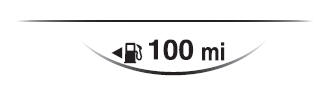
This displays the approximate distance you can travel on the remaining fuel based on the fuel economy.
The distance-to-empty will be calculated and displayed every second.
NOTE
- Even though the distance-to-empty display may indicate a sufficient amount of remaining driving distance before refueling is required, refuel as soon as possible if the fuel level is very low or the low fuel warning light illuminates.
- The display will not change unless you add more than approximately 9 L (2.3 US gal, 1.9 Imp gal) of fuel.
- The distance-to-empty is the approximate remaining distance the vehicle can be driven until all the graduation marks in the fuel gauge indicating the remaining fuel supply disappear.
- If there is no past fuel economy information such as after first purchasing your vehicle or the information is deleted when the battery cables are disconnected, the actual distance-to empty/range may differ from the amount indicated.
 Outside Temperature Display
When the ignition is switched ON, the outside temperature is displayed.
NOTE
Under the following conditions, the outside temperature display may differ
from the actual outside temperature depend ...
 Average Fuel Economy
The average fuel economy is calculated every minute from the total traveled distance
on the trip meter and the total fuel consumption, and the average fuel economy for
either TRIP A or TRIP B is d ...
Other materials:
Mazda 6 Owners Manual: Fuel line pressure inspection
Warning
Fuel line spills and leakage are dangerous. Fuel can ignite and
cause serious injuries or death. Fuel can also irritate skin and eyes. To
prevent this, always complete the BEFORE REPAIR PROCEDURE. (See BEFORE
REPAIR PROCEDURE.)
Caution
Disconnecting/connecting the quick r ...
Mazda 6 Owners Manual: Manual transaxle removal/installation
1. Remove the battery, battery tray and battery bracket.
2. Remove the air cleaner compornent. (See INTAKE-AIR SYSTEM
REMOVAL/INSTALLATION.)
3. Remove the wheels, tires and splash shields.
4. Remove the under cover.
5. Remove the steering gear and power steering pipe. (See STEERING GEAR AND
...