
Mazda 6 Owners Manual: Average Fuel Economy
The average fuel economy is calculated every minute from the total traveled distance on the trip meter and the total fuel consumption, and the average fuel economy for either TRIP A or TRIP B is displayed.
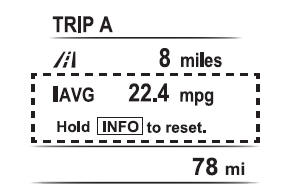
The average fuel economy and trip meters can be reset by pressing the INFO switch for 1.5 s or more while in each mode. After the data is cleared, the fuel consumption is recalculated and the - - - L/100 km (- - - mpg) for the one minute prior to it being displayed is indicated.
 Distance-to-empty
This displays the approximate distance you can travel on the remaining fuel based
on the fuel economy.
The distance-to-empty will be calculated and displayed every second.
NOTE
Even though t ...
 Current Fuel Economy
This displays the current fuel economy by calculating the amount of fuel consumption
and the distance traveled.
...
Other materials:
Mazda 6 Owners Manual: No.8 no cool air
When performing an asterisked (*) troubleshooting inspection, shake the
wiring harness and connectors while performing the inspection to discover
whether poor contact points are the cause of any intermittent malfunctions.
If there is a problem, check to make sure connectors, terminals ...
Mazda 6 Owners Manual: Transmitter battery replacement
1. Insert a small screwdriver into the slot and gently pry open the
transmitter.
2. Press the portion of the battery indicated by A and remove the battery.
3. Install a new battery (CR2025) into the front portion of the holder with
the positive pole (+) facing up. Press on the B portion of ...