
Mazda 6 Owners Manual: DSC OFF Switch
Press the DSC OFF switch to turn off the TCS/DSC. The DSC OFF indicator light in the instrument cluster will illuminate.
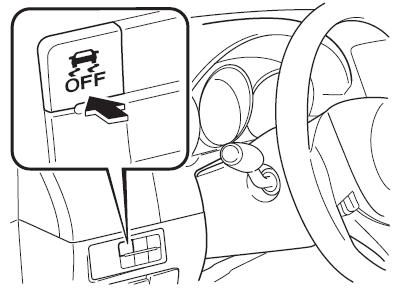
Press the switch again to turn the TCS/ DSC back on. The DSC OFF indicator light will turn off.
NOTE
- When DSC is on and you attempt to free the vehicle when it is stuck,
or drive it out of freshly fallen snow, the TCS (part of the DSC system) will
activate.
Depressing the accelerator will not increase engine power and freeing the vehicle may be difficult. When this happens, turn off the TCS/DSC.
- If the TCS/DSC is off when the engine is turned off, it automatically activates when the ignition is switched ON.
- Leaving the TCS/DSC on will provide the best traction.
- If the DSC OFF switch is pressed and held for 10 seconds or more, the DSC OFF switch malfunction detection function operates and the DSC system activates automatically. The DSC OFF indicator light turns off while the DSC system is operative.
- If the Smart City Brake Support (SCBS) operates with the TCS/DSC turned off, the TCS/DSC becomes operational automatically.
 DSC OFF Indicator Light
This indicator light stays on for a few seconds when the ignition is switched
ON. It also illuminates when the DSC OFF switch is pressed and TCS/DSC is switched
off.
Refer to DSC OFF Switch.
I ...
 i-ELOOP
i-ELOOP is a regenerative braking system. When you depress the brake pedal or
use engine braking, the kinetic energy that occurs is converted to electrical energy
by the power generator and the co ...
Other materials:
Mazda 6 Owners Manual: Fuel tank inspection
Caution
Disconnecting/connecting the quick release connector without
cleaning it may possibly cause damage to the fuel pipe and quick release
connector. Always clean the quick release connector joint area before
disconnecting/connecting using a cloth or soft brush, and make sure that it ...
Mazda 6 Owners Manual: Blind Spot Monitoring (BSM) Warning Indicator Lights/Display Indicator/ Blind
Spot Monitoring (BSM) Warning Beep
The Blind Spot Monitoring (BSM) or Rear Cross Traffic Alert (RCTA) system notifies
the driver of the presence of vehicles in adjacent lanes or at the rear of the vehicle
using the Blind Spot Monitoring (BSM) warning indicator light, the warning sound
and the display indicator (vehicles with mu ...