
Mazda 6 Service Manual: Inboard combination light removal/installation
1. Disconnect the negative battery cable.
2. Remove the trunk lid trim (liftgate lower trim). (See TRUNK LID TRIM REMOVAL/INSTALLATION) (See LIFTGATE LOWER TRIM REMOVAL/INSTALLATION)
3. Remove in the order indicated in the table.
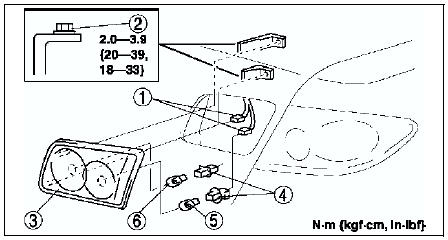
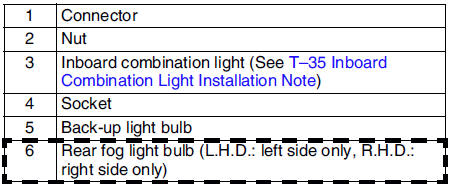
4. Install in the reverse order of removal.
Inboard Combination Light Installation Note
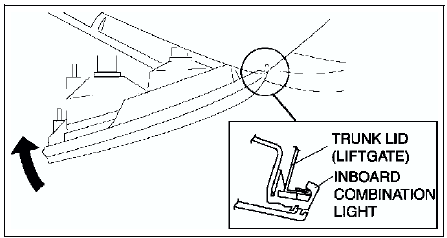
1. Insert the inboard combination light into the trunk lid (liftgate) as shown in the figure, then pivot it inward and fix in place.
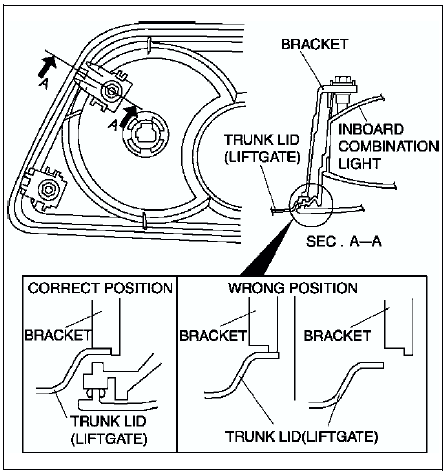
2. Pleace the bracket in the proper position as shown in the figure and press it to the trunk lid (liftgate) to attach.
 Rear combination light removal/installation
1. Disconnect the negative battery cable.
2. Remove the trunk side trim. (See TRUNK SIDE TRIM REMOVAL/INSTALLATION)
3. Remove in the order indicated in the table.
4. Install in the reverse orde ...
 High-mount brake light removal/installation
4SD
In-vehicle-type
1. Disconnect the negative battery cable.
2. Remove in the order indicated in the table.
3. Install in the reverse order of removal.
Rear spoiler type
1. Disconnect the n ...
Other materials:
Mazda 6 Service Manual: How to Use Pandora® (Some models)
What is Pandora®?
Pandora®*1 is free personalized Internet radio. Simply enter a favorite artist,
track, genre, and Pandora® will create a personalized station that plays their music
and more like it. Rate songs by giving thumbs-up and thumbs-down feedback to further
refine your station, d ...
Mazda 6 Service Manual: Power window motor inspection
Drivers Side
1. Disconnect the power window motor connector.
2. Apply battery positive voltage to the power window motor terminals E and F
and inspect the operation the power window motor operation.
If not as specified, replace the power window motor.
3. Apply battery positive voltage ...