
Mazda 6 Service Manual: Dtc 05:er01

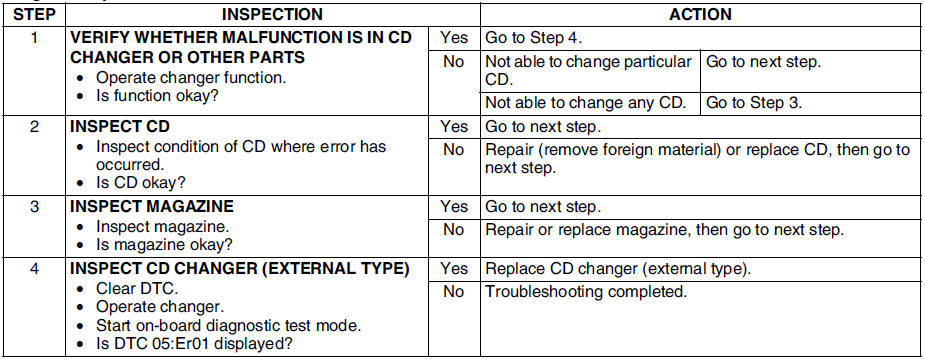
Diagnostic procedure
 Dtc 00:er04
Diagnostic procedure
...
 Dtc 05:er07
Diagnostic procedure
...
Other materials:
Mazda 6 Service Manual: Voice Recognition
In this section, the basic operation of the voice recognition is explained.
Activating Voice Recognition
Press the talk button.
Ending Voice Recognition
Use one of the following methods:
Press the hang-up button.
Say, “Cancel”.
Operate the commander switch or the center display (only ...
Mazda 6 Service Manual: Cigarette lighter removal/installation
1. Disconnect the negative battery cable.
2. Remove in the order indicated in the table.
3. Install in the reverse order of removal.
Socket Removal Note
1. Insert a tape-wrapped screwdriver into the socket hole, then press against
the ring protrusion to lift the socket toward you.
2. As ...
© 2016-2026 Copyright www.mazda6info.net