
Mazda 6 Service Manual: Dtc b1342
Caution
- When attaching the tester lead to the DSC HU/CM connector the SST (49 G066 004) must be used.

Diagnostic procedure
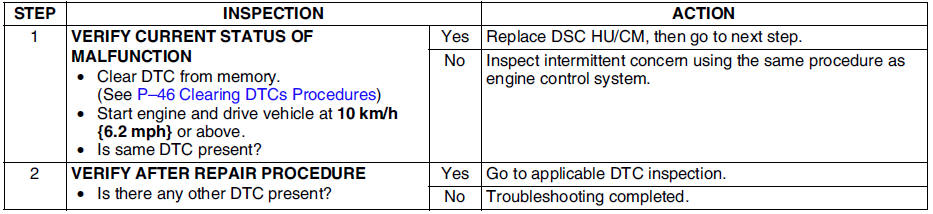
 Dtc b1318
Caution
When attaching the tester lead to the DSC HU/CM connector the SST (49
G066 004) must be used.
Diagnostic procedure
...
 Dtc b1483, b1484, b1486
Caution
When attaching the tester lead to the DSC HU/CM connector the SST
(49 G066 004) must be used.
Diagnostic procedure
...
Other materials:
Mazda 6 Service Manual: Units
Conversion to SI Units (Système International d'Unités)
All numerical values in this manual are based on SI units. Numbers shown
in conventional units are converted from these values.
Rounding Off
Converted values are rounded off to the same number of places as the SI
unit value ...
Mazda 6 Service Manual: Fuel pump unit disassembly/assembly
Warning
Fuel line spills and leakage are dangerous. Fuel can ignite and
cause serious injuries or death and damage. Fuel can also irritate skin and
eyes. To prevent this, do not damage the sealing surface of the fuel pump
unit when removing or installing.
1. Disassemble in the order ...
© 2016-2026 Copyright www.mazda6info.net