
Mazda 6 Owners Manual: HomeLink Wireless Control System (Some models)
NOTE
HomeLink and HomeLink house icon are registered trademarks of Gentex Corporation.
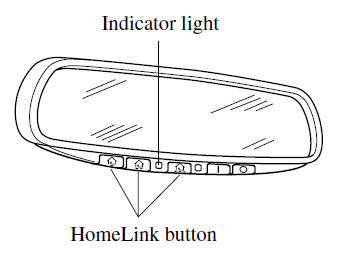
The HomeLink system replaces up to 3 hand-held transmitters with a single built-in component in the auto-dimming mirror. Pressing the HomeLink button on the auto-dimming mirror activates garage doors, gates and other devices surrounding your home.
WARNING
Do not use the HomeLink system with any garage door opener that lacks the safety stop and reverse feature:
Using the HomeLink system with any garage door opener that lacks the safety stop and reverse feature as required by federal safety standards is dangerous. (This includes garage doors manufactured before April 1, 1982.) Using these garage door openers can increase the risk of serious injury or death. For further information, contact HomeLink at 1-800-355-3515 or www. homelink.com or an Authorized Mazda Dealer.
Always check the areas surrounding garage doors and gates for people or obstructions before programming or during operation of the HomeLink system:
Programming or operating the HomeLink system without verifying the safety of areas surrounding garage doors and gates is dangerous and could result in an unexpected accident and serious injury if someone were to be hit.
NOTE
The programming will not be erased even if the battery is disconnected.
- Pre-programming the HomeLink System
- Programming the HomeLink System
- Gate operator/Canadian Programming
- Operating the HomeLink System
- Reprogramming the HomeLink system
- Erasing Programmed HomeLink Buttons
 Hazard Warning Flasher
The hazard warning lights should always be used when you stop on or near a roadway
in an emergency.
The hazard warning lights warn other drivers that your vehicle is a traffic hazard
and that t ...
 Pre-programming the HomeLink System
NOTE
It is recommended that a new battery be placed in the hand-held transmitter
of the device being programmed to HomeLink for quicker training and accurate transmission
of the radio-frequency s ...
Other materials:
Mazda 6 Owners Manual: Troubleshooting
Mazda Bluetooth® Hands-Free Customer Service
If you have any problems with Bluetooth®, contact our toll-free customer service
center.
U.S.A. Phone: 800-430-0153 (Toll-free) Web:
www.MazdaUSA.com/bluetooth
Canada Phone: 800-430-0153 (Toll-free) Web:
www.mazdahandsfree.ca
Mexico Cente ...
Mazda 6 Owners Manual: Automatic transaxle fluid (atf) replacement
Warning
When the transaxle and ATF are hot, they can badly burn you. Turn
off the engine and wait until they are cool before changing the ATF.
1. Remove the oil dipstick.
2. Remove the oil drain plug and washer.
3. Drain the ATF into a container.
4. Install a new washer and the drain ...