
Mazda 6 Owners Manual: Lane-keep Assist System (LAS) & Lane Departure Warning System (LDWS)
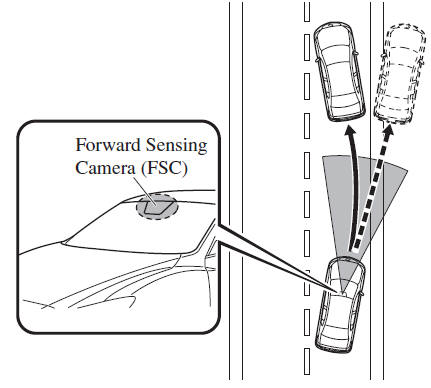
The Lane-keep Assist System (LAS) & Lane Departure Warning System (LDWS) alerts the driver that the vehicle may be deviating from its lane and it provides steering assistance to help the driver stay within the vehicle lanes.
The Forward Sensing Camera (FSC) detects the white lines (yellow lines) of the vehicle lane in which the vehicle is traveling and if the system determines that the vehicle may deviate from its lane, it operates the electric power steering to assist the driver's steering operation. The system also alerts the driver by activating a lane departure warning sound, vibrating the steering wheel, and indicating an alert in the display.
Refer to Forward Sensing Camera (FSC).
WARNING
- Do not rely completely on the Lane-keep Assist System (LAS) & Lane
Departure Warning System (LDWS):
The Lane-keep Assist System (LAS) & Lane Departure Warning System (LDWS) is not an automatic driving system. In addition, the system is not designed to compensate for a driver's lack of caution, and over-reliance on the system could lead to an accident.
- The detection ability of the Lane-keep Assist System (LAS) & Lane Departure Warning System (LDWS) is limited. Always stay on course using the steering wheel and drive with care.
Do not use the Lane-keep Assist System (LAS) & Lane Departure Warning System (LDWS) in the following cases:
The system may not operate adequately according to the actual driving conditions, resulting in an accident.
- Driving on roads with tight curves.
- Driving under bad weather conditions (rain, fog, and snow).
- Slippery roads such as ice or snow-bound roads.
- Roads with heavy traffic and insufficient distance between vehicles.
- Roads with no white (yellow) lane lines.
- Narrow roads resulting from road construction or lane closures.
- The vehicle is driven on a temporary lane or section with a closed lane resulting from road construction where there may be multiple white (yellow) lane lines or they are interrupted.
- The tire pressures are not adjusted to the specified pressure.
- Tires of a different specified size are used, such as an emergency spare tire.
CAUTION
Heed the following cautions so that the Lane-keep Assist System (LAS) & Lane Departure Warning System (LDWS) can operate normally.
- Do not modify the suspensions.
- Always use wheels of the specified type and size for the front and rear wheels. Consult an Authorized Mazda Dealer for tire replacement.
NOTE
- When the turn signal lever is operated for a lane change, the Lane-keep Assist System (LAS) & Lane Departure Warning System (LDWS) is automatically disabled. The Lane-keep Assist System (LAS) & Lane Departure Warning System (LDWS) becomes operational again when the turn signal lever is returned and the system detects white (yellow) lane lines while the vehicle is being driven normally within its vehicle lane.
- If the steering wheel, accelerator pedal, or brake pedal is operated abruptly and the vehicle moves close to a white (yellow) line, the system determines that the driver is making a lane change and the Lane-keep Assist System (LAS) & Lane Departure Warning System (LDWS) operation is temporarily canceled. The Lane-keep Assist System (LAS) & Lane Departure Warning System (LDWS) becomes operational again when the system detects white (yellow) lane lines while the vehicle is being driven normally within its vehicle lane.
- If the vehicle deviates from its lane repeatedly within a short period of time, the Lanekeep Assist System (LAS) & Lane Departure Warning System (LDWS) may not operate.
- When white (yellow) lane lines are not detected, the Lane-keep Assist System (LAS) & Lane Departure Warning System (LDWS) does not operate.
- Under the following conditions, the Lane-keep Assist System (LAS) & Lane
Departure Warning System (LDWS) may not be able to detect white (yellow) lane
lines correctly and it may not operate normally.
- If an object placed on the dashboard is reflected in the windshield and picked up by the camera.
- Heavy luggage is loaded in the luggage compartment or on the rear seat and the vehicle is tilted.
- The tire pressures are not adjusted to the specified pressure.
- Tires other than conventional tires are equipped.
- When the vehicle is driven on the guiding branch to or from the rest area or tollgate of a highway.
- The white (yellow) lane lines are less visible because of dirt or fading/patchiness.
- A vehicle in front of your vehicle is running near a white (yellow) lane line making it less visible.
- A white (yellow) lane line is less visible because of bad weather (rain, fog, or snow).
- The vehicle is driven on a temporary lane or section with a closed lane resulting from construction where there may be multiple white (yellow) lane lines or they are interrupted.
- A misleading line is picked up on the road such as a temporary line for construction, or because of shade, lingering snow, or grooves filled with water.
- The surrounding brightness suddenly changes such as when entering or exiting a tunnel.
- The illumination of the headlights is weakened because of dirt or the optical axis is deviated.
- The windshield is dirty or foggy.
- The windshield, camera is fogged (water droplets).
- Back-light is reflected off the road surface.
- The road surface is wet and shiny after rain, or there are puddles on the road.
- The shade of a guardrail parallel to a white (yellow) lane line is cast on the road.
- The width of the driving lane is narrow (less than about 2.5 m (98 in)) or wide (more than about 4.5 m (178 in))
- Driving on roads with tight curves.
- The road is excessively uneven.
- The vehicle is shaken after hitting a road bump.
- There are two or more adjacent white (yellow) lane lines.
- There are various road markings or lane markings of various shapes near an intersection.
 Cruise Control Function
While this function is operating, the headway control operation is canceled and
only the cruise control function operates.
The vehicle speed can be set more than about 25 km/h (16 mph).
Use the cr ...
 System Operation
Make sure that the Lane-keep Assist System (LAS) & Lane Departure Warning System
(LDWS) OFF indicator light in the instrument cluster is turned off. When the Lane-keep
Assist System (LAS) & ...
Other materials:
Mazda 6 Owners Manual: How to connect USB port/Auxiliary jack
Connecting a device
1. Open the console lid.
2. Connect the connector on the device to the USB port.
Connecting with a connector cable
1. Open the console lid.
2. Connect the device plug/connector cable to the auxiliary jack/USB port. Pass
the device plug/connector cable through the notch i ...
Mazda 6 Owners Manual: Fuel Economy Monitor
The Control Status and Fuel Consumption are switched and displayed by operating
each icon in the display.
In addition, after completing a trip, the total energy efficiency to date is
displayed in the ending display when the ending display is turned on.
1. Select the icon on the home
screen ...