
Mazda 6 Owners Manual: System Canceling
When the Lane-keep Assist System (LAS) & Lane Departure Warning System (LDWS) is turned off, press the Lane-keep Assist System (LAS) & Lane Departure Warning System (LDWS) OFF switch.
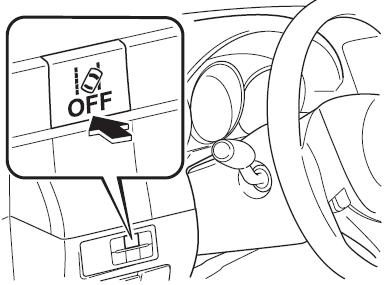
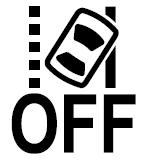
The Lane-keep Assist System (LAS) & Lane Departure Warning System (LDWS) OFF indicator light turns on.
NOTE
- When the ignition is switched OFF, the system status before it was turned off is maintained. For example, if the ignition is switched OFF with the lane-keep system operable, the system will be operable when the ignition is switched ON the next time.
- In the following cases, the Lane-keep Assist System (LAS) & Lane Departure
Warning System (LDWS) is canceled automatically and the Lane-keep Assist System
(LAS) & Lane Departure Warning System (LDWS) OFF indication is displayed in
the multiinformation display. Have your vehicle inspected at an Authorized Mazda
Dealer.
- There is a malfunction in the power steering.
- There is a malfunction in the DSC.
- There is a malfunction in the Forward Sensing Camera (FSC).
When the Lane-keep Assist System (LAS) & Lane Departure Warning System (LDWS) is turned off, the vehicle lane line indication in the multi-information display and the active driving display turn off.
 System Operation
Make sure that the Lane-keep Assist System (LAS) & Lane Departure Warning System
(LDWS) OFF indicator light in the instrument cluster is turned off. When the Lane-keep
Assist System (LAS) & ...
 Lane Departure Warning
If the system determines that the vehicle may deviate from its lane, the lane
departure warning (beep sound, rumble sound*1, or steering wheel vibration) is activated
and the direction in which th ...
Other materials:
Mazda 6 Owners Manual: Excessive Speed Warning
If the vehicle speed exceeds the speed limit sign displayed on the active driving
display, the warning sound is activated and the area around the speed limit sign
displayed on the active driving display flashes 3 times in amber, and if the vehicle
speed continues to exceed the displayed speed ...
Mazda 6 Owners Manual: Storage Compartments
WARNING
Keep storage boxes closed when driving: Driving with the storage
boxes open is dangerous. To reduce the possibility of injury in an accident or a
sudden stop, keep the storage boxes closed when driving.
Do not put articles in storage spaces with no lid: Putting articles
in storage sp ...