
Mazda 6 Service Manual: Magnetic clutch disassembly/assembly
1. Disassemble in the order indicated in the table.
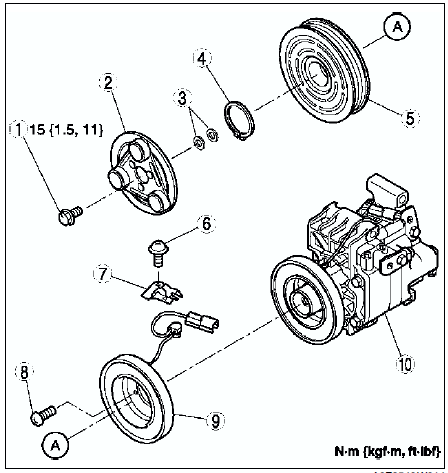
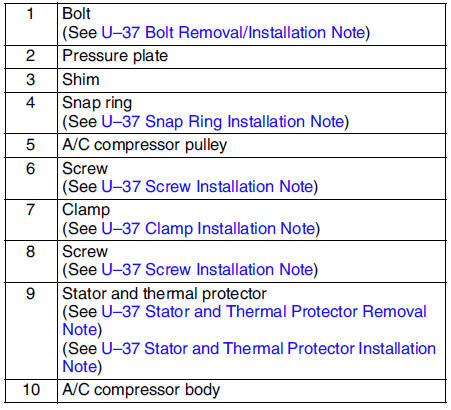
2. Assemble in the reverse order of disassembly.
3. Adjust the magnetic clutch clearance. (See MAGNETIC CLUTCH ADJUSTMENT.)
Bolt Removal/Installation Note
1. When removing or installing the bolt, hold the pressure plate in place as shown in the figure.
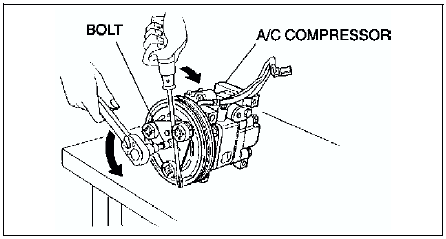
2. When installing a new A/C compressor body, replace the bolt.
Stator and Thermal Protector Removal Note
After removing the stator and thermal protector, completely remove the silicone adhering to the A/C compressor side.
Stator and Thermal Protector Installation Note
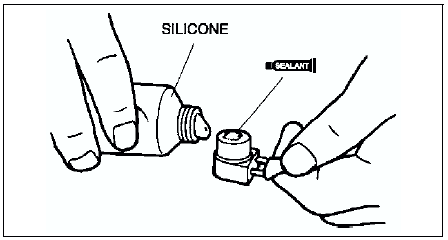
Apply approximately 1 g {0.04 oz} of silicone (Shin-Etsu Silicone KE-347W or similar) to the contact surface of the thermal protector, then thoroughly install it onto the A/C compressor, leaving no gaps.
Screw Installation Note
When installing a new stator and thermal protector, replace the screw.
Clamp Installation Note
When installing a new stator and thermal protector, replace the clamp.
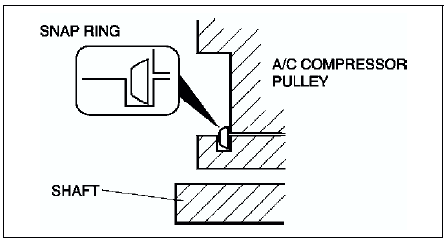
Snap Ring Installation Note
When installing a new pressure plate, A/C compressor pulley, stator, or A/C compressor body, replace the snap ring.
 Power mos fet inspection
Verify that the resistance between the terminals of the power MOS FET is as
shown in the table.
If not as specified, replace the power MOS FET.
...
 Magnetic clutch adjustment
1. Measure the clearance around the entire circumference between the pressure
plate and A/C compressor pulley using a thickness gauge.
2. Verify that the clearance is within the specification.
...
Other materials:
Mazda 6 Service Manual: Outside Temperature Display (Without Multi-information Display)
When the ignition is switched ON, the outside temperature is displayed.
NOTE
Under the following conditions, the outside temperature display may differ
from the actual outside temperature depending on the surroundings and vehicle conditions:
Significantly cold or hot temperatures.
Sudden ...
Mazda 6 Service Manual: Engine coolant
ENGINE COOLANT LEVEL INSPECTION
Verify that the coolant level in the coolant reservoir is between the F and L
marks.
If the engine coolant level is below L, remove the radiator cap and add
coolant. (See COOLING SYSTEM SERVICE WARNINGS.)
ENGINE COOLANT REPLACEMENT
Warning
Drain the ...