
Mazda 6 Owners Manual: Maintenance Monitor
The following maintenance period notifications can be displayed by turning the Maintenance Monitor on.
- Scheduled Maintenance
- Tire Rotation
- Oil Change
For the setting method and indications for the maintenance monitor, refer to the Maintenance Monitor.
The maintenance monitor displays the information when the ignition is switched ON.
NOTE
This function is inoperable while the vehicle is being driven.
Message display
When the remaining time or the distance approaches 0, a message is displayed each time the ignition is switched ON.
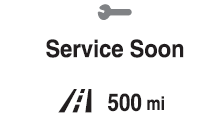
NOTE
- If any of the INFO switch is pressed while a message is displayed, it will no longer be displayed the next time the ignition is switched ON.
- After the vehicle is serviced and the remaining time/distance is reset, the message for the next maintenance period will be displayed when the remaining distance or time to the next maintenance period approaches 0 (displays when engine is started).
- If there are multiple messages, they are displayed according to their order.
- If OFF is set for Messages, messages are not displayed.
 Current Fuel Economy
This displays the current fuel economy by calculating the amount of fuel consumption
and the distance traveled.
...
 Blind Spot Monitoring (BSM) Display
Displays the system status.
Refer to Blind Spot Monitoring (BSM). ...
Other materials:
Mazda 6 Owners Manual: Rear View Monitor
The rear view monitor provides visual images of the rear of the vehicle when
reversing.
WARNING
Always drive carefully confirming the safety of the rear and the surrounding
conditions by looking directly with your eyes: Reversing the vehicle by only
looking at the screen is dangerous as it m ...
Mazda 6 Owners Manual: Dtc c1955, c1956
Caution
When attaching the tester lead to the DSC HU/CM connector the SST
(49 G066 004) must be used.
Diagnostic procedure
...