
Mazda 6 Owners Manual: Rear Cross Traffic Alert (RCTA) (Some models)
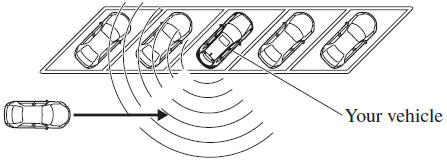
The Rear Cross Traffic Alert (RCTA) system is designed to assist the driver in checking the area to the rear of the vehicle on both sides while the vehicle is reversing by alerting the driver to the presence of vehicles approaching the rear of the vehicle.
The Rear Cross Traffic Alert (RCTA) system detects vehicles approaching from the left and right sides of the vehicle while the vehicle is being reversed out of a parking space, and notifies the driver of possible danger using the Blind Spot Monitoring (BSM) warning indicator lights and the warning buzzer.
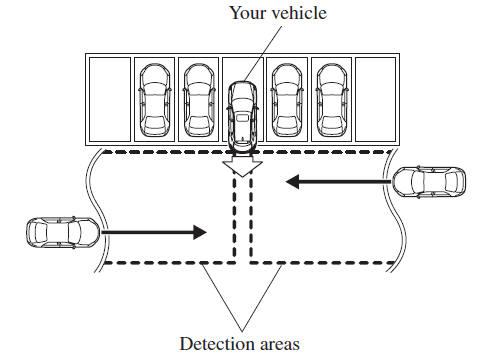
Rear Cross Traffic Alert (RCTA) operation
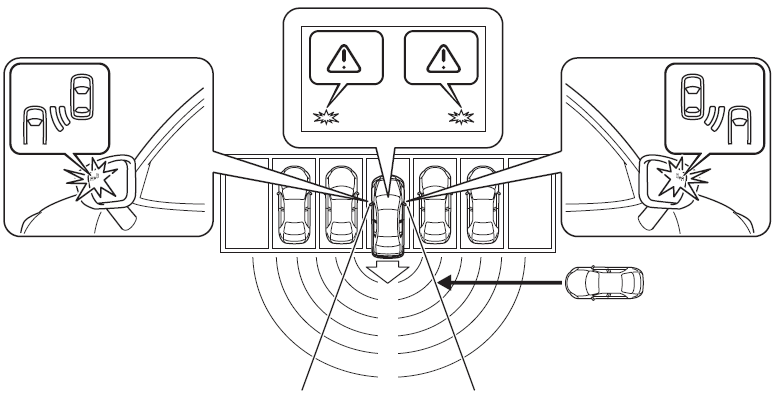
1. The Rear Cross Traffic Alert (RCTA) system operates when the shift lever (manual transaxle) or the selector lever (automatic transaxle) is shifted to the reverse (R) position.
2. If there is the possibility of a collision with an approaching vehicle, the Blind Spot Monitoring (BSM) warning indicator lights flashes and the warning beep is activated simultaneously.
The Rear Cross Traffic Alert (RCTA) warning indication in the rearview monitor also synchronizes with the Blind Spot Monitoring (BSM) warning indicator light on the door mirrors.
WARNING
Always check the surrounding area visually before actually putting the vehicle in reverse:
The system is only designed to assist you in checking for vehicles at the rear when putting the vehicle in reverse. Due to certain limitations with the operation of this system, the Blind Spot Monitoring (BSM) warning indicator lights may not flash or it might be delayed even though a vehicle is behind your vehicle. Always make it your responsibility as a driver to check the rear.
NOTE
- In the following cases, the Blind Spot Monitoring (BSM) OFF indicator
light turns on and operation of the system is stopped. If the Blind Spot Monitoring
(BSM) OFF indicator light remains illuminated, have the vehicle inspected at
an Authorized Mazda Dealer as soon as possible.
- Some problem with the system including the Blind Spot Monitoring (BSM) warning indicator lights has occurred.
- A large deviation in the installation position of a radar sensor (rear) on the vehicle has occurred.
- There is a large accumulation of snow or ice on the rear bumper near a radar sensor (rear).
- Driving on snow-covered roads for long periods.
- The temperature near the radar sensors becomes extremely hot due to driving for long periods on slopes during the summer.
- The battery voltage has decreased.
- Under the following conditions, the radar sensors (rear) cannot detect
target objects or it may be difficult to detect them.
- The vehicle speed when reversing is about 15 km/h (9 mph) or faster.
- The radar sensor (rear) detection area is obstructed by a nearby wall or parked vehicle. (Reverse the vehicle to a position where the radar sensor detection area is no longer obstructed.)
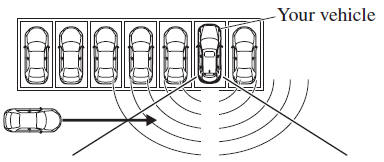
- A vehicle is approaching directly from the rear of your vehicle.
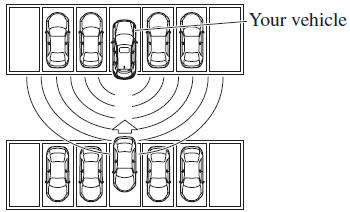
- The vehicle is parked on a slant.
- Directly after the Blind Spot Monitoring (BSM) system becomes operable.
- In the following cases, it may be difficult to view the illumination/flashing
of the Blind Spot Monitoring (BSM) warning indicator lights equipped on the
door mirrors.
- Snow or ice adheres to the door mirrors.
- The front door glass is fogged or covered in snow, frost or dirt.
- Turn off the Rear Cross Traffic Alert (RCTA) system while pulling a trailer or while an accessory such as a bicycle carrier is installed to the rear of the vehicle. Otherwise, the radio waves emitted by the radar will be blocked causing the system to not operate normally.
 Indication on Display
The Distance Recognition Support System (DRSS) operation status is indicated
in the active driving display or multi-information display. Regarding malfunctions,
check the vehicle conditions or hav ...
 Mazda Radar Cruise Control (MRCC) (Some models)
The Mazda Radar Cruise Control (MRCC) system is designed to maintain headway
control*1 according to the vehicle speed using a radar sensor (front) to detect
the distance to a vehicle ahead, and by ...
Other materials:
Mazda 6 Owners Manual: Caliper (front) disassembly/assembly
1. Disassemble in the order indicated in the table.
2. Assemble in the reverse order of removal.
Piston Disassembly Note
Caution
Blow the compressed air slowly to prevent the piston from suddenly
popping out.
1. Place a piece of wood in the caliper, then blow compressed air through ...
Mazda 6 Owners Manual: Rear brake (disc) inspection
Brake Judder Repair Hint
1. (See FRONT BRAKE (DISC) INSPECTION.)
Disc Plate Thickness Inspection
Caution
Excessive runout may result if the disc plate is removed from the
vehicle then machined. Machine the disc plate while installed on the
vehicle.
1. Measure the thickness of the dis ...