
Mazda 6 Service Manual: Rear package trim removal/installation
1. Remove the high-mount brake light.
2. Fold the rear seat back.
3. Remove the fasteners.
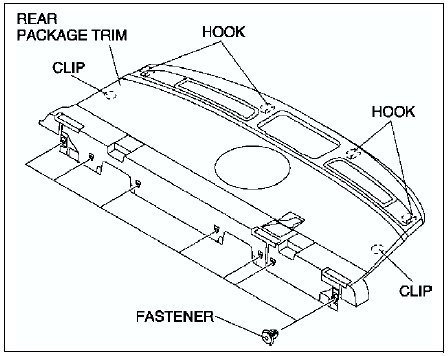
4. Pull the rear package trim upward, then disengage the clips from the body.
5. Disengage the hooks, then remove the rear package trim.
6. Install in the reverse order of removal.
 Tire house trim removal/installation
4SD
1. Remove the rear scuff plate.
2. Remove the rear seat side.
3. Remove the fastener.
4. Pull the tire house trim upward, then disengage clips A from the body, and
remove the tire house tr ...
 Trunk side trim removal/installation
4SD
1. Remove the trunk end trim.
2. Remove the fasteners, then remove the trunk side trim.
3. Install in the reverse order of removal.
5HB
1. Remove the trunk end trim.
2. Remove the trunk si ...
Other materials:
Mazda 6 Service Manual: Windshield removal
1. Remove the rearview mirror.
2. Remove the cowl grille.
3. Remove the headliner.
4. Apply protective tape along the edge of the body to protect it from
damage.
5. Apply protective tape to the dashboard to protect it from damage.
6. Cut the lip of the windshield molding using a razor.
War ...
Mazda 6 Service Manual: Saving Fuel and Protection of the Environment
How you operate your Mazda determines how far it will travel on a tank of fuel.
Use these suggestions to help save fuel and reduce CO2.
Avoid long warm-ups. Once the engine runs smoothly, begin driving.
Avoid fast starts.
Drive at lower speeds.
Anticipate when to apply the brakes (avoid ...