
Mazda 6 Service Manual: Rear washer hose removal/installation
1. Disconnect the negative battery cable.
2. Remove the washer tank. (See WASHER TANK REMOVAL/INSTALLATION)
3. Partially peel off the right side mud guard.
4. Remove rear washer hose No.1 from the clips.
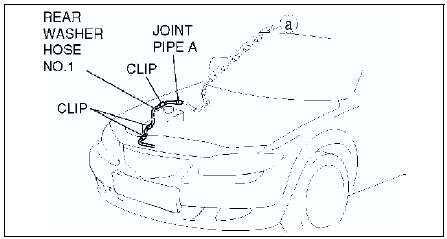
5. Remove rear washer hose No.1 and joint pipe A.
6. Remove the A-pillar trim. (See A-PILLAR TRIM REMOVAL)
7. Remove rear washer hose No.2 from clip A.
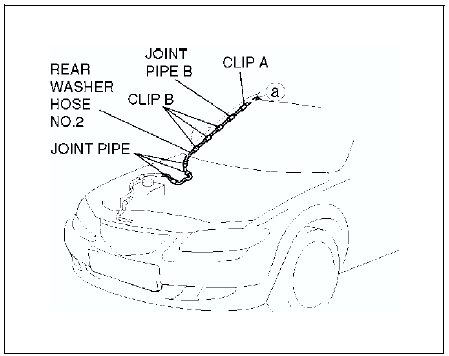
8. Remove clips B from the body.
9. Remove rear washer hose No.2 and joint pipes B.
10. Remove the C-pillar trim. (See C-PILLAR TRIM REMOVAL/INSTALLATION)
11. Remove the liftgate upper trim. (See LIFTGATE UPPER TRIM REMOVAL/INSTALLATION)
12. Remove rear washer hose No.3 from clip C.
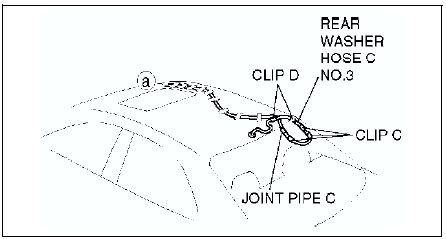
13. Remove clips D from the body.
14. Remove rear washer hose No.3 and joint pipe C.
15. Remove the headliner. (See HEADLINER REMOVAL/INSTALLATION)
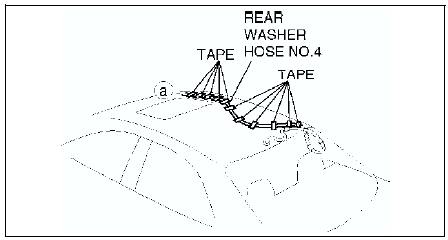
16. Remove the tape from rear washer hose No.4.
17. Install in the reverse order of removal.
 Rear washer nozzle adjustment
Insert a needle or an equivalent tool into the spray hole of the rear washer
nozzle and adjust the nozzle direction as shown.
REAR WASHER NOZZLE CLEANING
Clean the rear washer nozzle. (See WINDS ...
 Intermittent rear wiper relay removal/installation
5HB
1. Disconnect the negative battery cable.
2. Remove the trunk side trim. (See TRUNK SIDE TRIM REMOVAL/INSTALLATION)
3. Remove in the order indicated in the table.
4. Install in the reverse ...
Other materials:
Mazda 6 Service Manual: Operating Tips for AAC
AAC stands for Advanced Audio Coding, which is standardized voice compression
established by the ISO*1 working group (MPEG). Audio data can be created and stored
at a higher compression ratio than MP3.
This unit plays files with the extensions (.aac/.m4a/.wav) as the AAC files.
*1 Internationa ...
Mazda 6 Service Manual: Rear Window Defogger
The rear window defogger clears fog from the rear window.
The ignition must be switched ON to use the defogger.
Press the switch to turn on the rear window defogger. The rear window defogger
operates for about 15 minutes and then turns off automatically.
The indicator light illuminates when the ...