
Mazda 6 Service Manual: Selector lever disassembly/assembly
1. Disassemble in the order shown in the figure.
2. Assemble in the reverse order of disassembly.
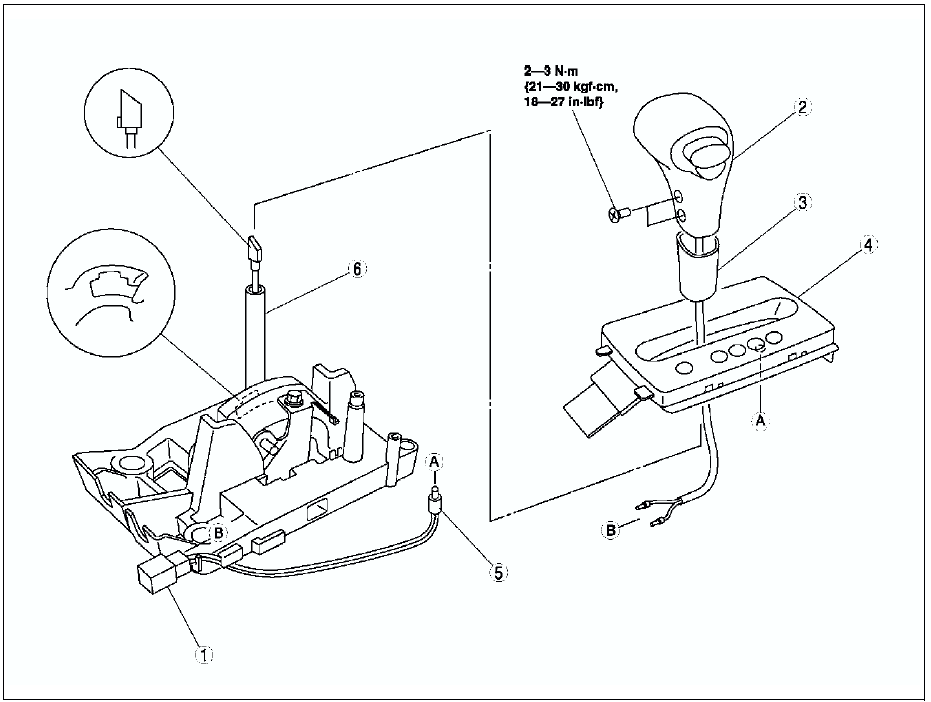

Connector Disassembly Note
1. Insert a thin piece of metal from the terminal side of the connector, and press down the terminal locking tab.
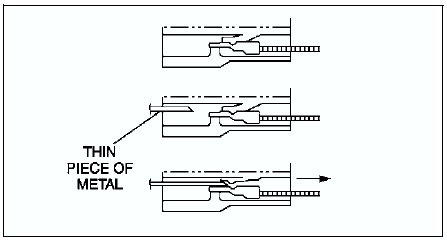
2. Pull the terminal out of the connector.
 Selector lever removal/installation
1. Disconnect the negative battery cable.
2. Remove battery and battery tray.
3. Remove the air cleaner compornent. (See INTAKE-AIR SYSTEM
REMOVAL/INSTALLATION.)
4. Remove the console.
5. Remove ...

Other materials:
Mazda 6 Service Manual: Engine Coolant Temperature Gauge
Displays the engine coolant temperature. The blue gauge indicates that the engine
coolant temperature is low, and the red gauge indicates that the engine coolant
temperature is high and overheating.
CAUTION
If the high engine coolant temperature warning light (red) turns on, there
is a pos ...
Mazda 6 Service Manual: Height Adjustment
Adjust the head restraint so that the center is even with the top of the passenger's
ears.
To raise a head restraint, pull it up to the desired position.
To lower the head restraint, press the stopcatch release, then push the head
restraint down.
Front outboard seat
Rear outboard seat
...