
Mazda 6 Owners Manual: Warning Light and Brake Pad Wear Indicator
Warning Light
The warning light turns on when the system has a malfunction.
Refer to Warning Indication/Warning Lights
Brake Pad Wear Indicator
When the disc brake pads become worn, the built-in wear indicators contact the disc plates. This causes a screeching noise to warn that the pads should be replaced.
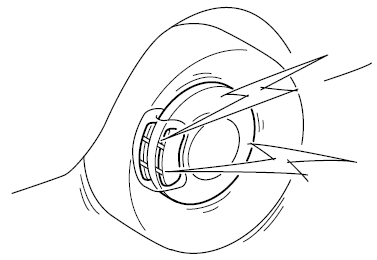
When you hear this noise, consult an Authorized Mazda Dealer as soon as possible.
WARNING
Do not drive with worn disc pads:
Driving with worn disc pads is dangerous. The brakes could fail and cause a serious accident. As soon as you hear a screeching noise consult an Authorized Mazda Dealer.
Brake Assist
During emergency braking situations when it is necessary to depress the brake pedal with greater force, the brake assist system provides braking assistance, thus enhancing braking performance.
When the brake pedal is depressed hard or depressed more quickly, the brakes apply more firmly.
NOTE
- When the brake pedal is depressed hard or depressed more quickly, the pedal will feel softer but the brakes will apply more firmly. This is a normal effect of the brake assist operation and does not indicate a malfunction.
- When the brake pedal is depressed hard or depressed more quickly, a motor/pump operation noise may be heard. This is a normal effect of the brake assist and does not indicate a malfunction.
- The brake assist equipment does not supersede the functionality of the vehicle's main braking system.
 Electric Parking Brake
The electric parking brake equipment applies the parking brake using an electric
motor. When the electric parking brake is applied, the electric parking brake switch
indicator light turns on.
W ...
 Hill Launch Assist (HLA)
Hill Launch Assist (HLA) is a function which assists the driver in accelerating
from a stop while on a slope. When the driver releases the brake pedal and depresses
the accelerator pedal while on ...
Other materials:
Mazda 6 Owners Manual: Variable air duct (vad) shutter valve inspection (l3)
1. Remove the air cleaner case. (See INTAKE-AIR SYSTEM REMOVAL/INSTALLATION.)
2. Disconnect the vacuum hose from the VAD shutter valve actuator.
3. Connect a vacuum pump to the VAD shutter valve actuator.
4. Apply vacuum and verify that the rod moves.
If the rod dose not move, replace the a ...
Mazda 6 Owners Manual: Viewing the Display
Guide lines which indicate the width of the vehicle (yellow) are displayed on
the screen as a reference to the approximate width of the vehicle in comparison
to the width of the parking space you are about to back into.
Use this display view for parking your vehicle in a parking space or garage ...