
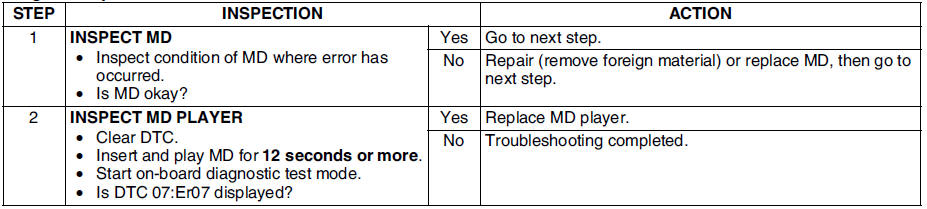
Mazda 6 Service Manual: Dtc 07:er07

Diagnostic procedure
 Dtc 07:er02
Diagnostic procedure
...
 Diagnostic assist function
Structural View
Switch location
LCD Inspection
1. With audio on, first press the POWER button, then simultaneously press the
SEEK button (upper) for approximately 1 second.
2. Inspect the LC ...
Other materials:
Mazda 6 Service Manual: Vehicle Loading
WARNING
Do not tow a trailer with this vehicle: Towing a trailer with this
vehicle is dangerous because it has not been designed to tow a trailer and doing
so will affect the drive system which could result in vehicle damage.
This section will guide you in the proper loading of your vehicle, t ...
Mazda 6 Service Manual: Receiving an Incoming Call
When an incoming call is received, the incoming call notification screen is displayed.
The “Incoming Call Notifications” setting must be on.
To accept the call, press the pick-up button on the audio control switch or select
on the screen.
To reject the call, press the hang-up button on the ...
© 2016-2026 Copyright www.mazda6info.net