
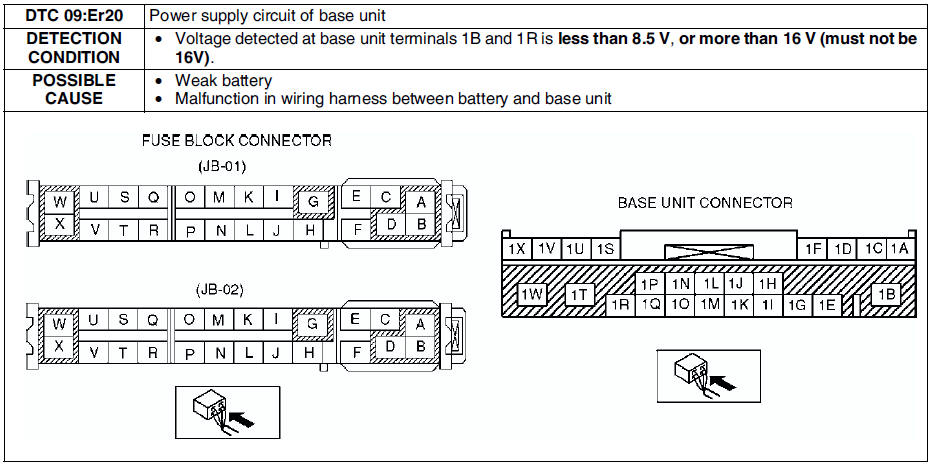
Mazda 6 Service Manual: Dtc 09:er20
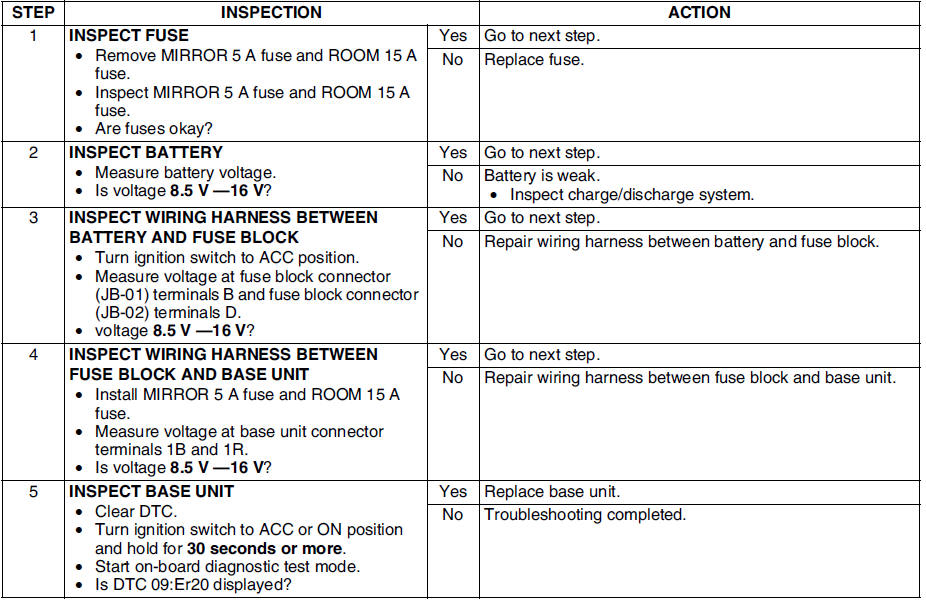
Diagnostic procedure
 Dtc 09:er22
Diagnostic procedure
...
 Dtc 00:er10
Diagnostic procedure
...
Other materials:
Mazda 6 Service Manual: Tiedown Hooks (Some models)
CAUTION
Do not use the front and rear tiedown eyelets for towing the vehicle. They
have been designed only for securing the vehicle to a transport vessel during shipping.
Using the eyelets for any other purpose could result in the vehicle being damaged.
Tiedown Hooks
1. Remove the tiedown eye ...
Mazda 6 Service Manual: Clutch disc inspection
1. Using vernier calipers, measure the thickness of the lining at a rivet
head on both sides.
Replace the clutch disc if its thickness is less than the minimum.
Thickness
0.3 mm {0.012 in} min.
2. Measure the clutch disc runout using a dial indicator.
If the runout is excessiv ...
© 2016-2026 Copyright www.mazda6info.net