
Mazda 6 Owners Manual: Mazda Radar Cruise Control (MRCC) Display (Some models)
Displays the currently set system status.
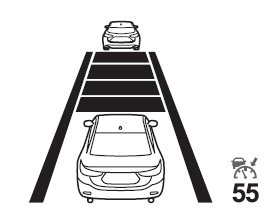
Refer to Mazda Radar Cruise Control (MRCC).
 Distance Recognition Support System (DRSS) Display (Some models)
Displays the distance between your vehicle and the vehicle ahead.
Refer to Distance Recognition Support System (DRSS). ...
 Lane-keep Assist System (LAS) & Lane Departure Warning System (LDWS) Display
(Some models)
Lane-keep Assist System (LAS) & Lane Departure Warning System (LDWS) Display
(Some models)
Displays the system status.
Refer to Lane-keep Assist System (LAS) & Lane Departure Warning System (LDWS). ...
Other materials:
Mazda 6 Owners Manual: Vehicle speedometer sensor (vss) removal/installation
Caution
Water or foreign objects entering the connector can cause a poor
connection or corrosion. Be sure not to drop water or foreign objects on the
connector when disconnecting it.
If foreign materials are stuck to the VSS, disturbance by magnetic
flux can cause sensor output to be ...
Mazda 6 Owners Manual: Center panel module disassembly/assembly
Caution
Before disassembling the center panel module, spread a cloth on the floor to
put the disassembled parts on. This protects the surface of the panel from
scratches or dirt.
1. Remove the center panel module. (See CENTER PANEL MODULE
REMOVAL/INSTALLATION.)
2. Remove in the order i ...