
Mazda 6 Owners Manual: Meters and Gauges
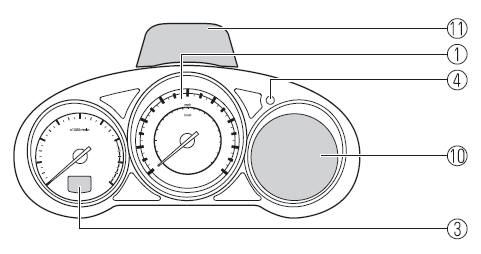
Instrument Cluster Type A
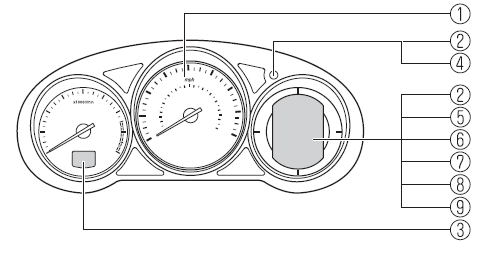
Type B
Steering Switch
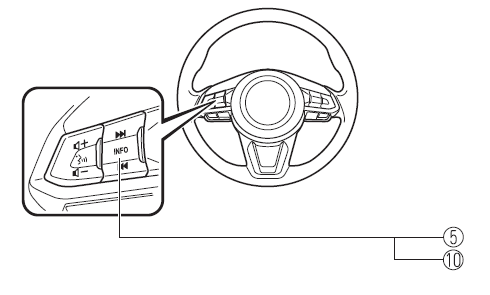
1 - Speedometer 2 - Odometer, Trip Meter and Trip Meter Selector 3 - Tachometer 4 - Dashboard Illumination 5 - Trip Computer and INFO Switch 6 - Engine Coolant Temperature Gauge 7 - Fuel Gauge 8 - Outside Temperature Display 9 - Cruise Control Set Vehicle Speed Display 10 - Multi-information Display and INFO Switch 11 - Active Driving Display
- Speedometer, Odometer, Trip Meter and Trip Meter Selector (Without Multiinformation Display)
- Tachometer
- Engine Coolant Temperature Gauge (Without Multi-information Display)
- Fuel Gauge (Without Multiinformation Display)
- Dashboard Illumination
- Outside Temperature Display (Without Multi-information Display)
- Cruise Control Set Vehicle Speed Display (Without Multiinformation Display)
- Trip Computer and INFO Switch (Without Multi-information Display)

 Speedometer, Odometer, Trip Meter and Trip Meter Selector (Without Multiinformation
Display)
Speedometer, Odometer, Trip Meter and Trip Meter Selector (Without Multiinformation
Display)
The speedometer indicates the speed of the vehicle.
The display mode can be changed from odometer to trip meter A to trip meter B
and then back to odometer by pressing the selector while one of the ...
Other materials:
Mazda 6 Owners Manual: Mazda Importer/Distributors
U.S.A.
Mazda North American Operations
7755 Irvine Center Drive
Irvine, CA 92618-2922 U.S.A.
P.O. Box 19734
Irvine, CA 92623-9734 U.S.A.
TEL: 1 (800) 222-5500 (in U.S.A.)
(949) 727-1990 (outside U.S.A.)
CANADA
Mazda Canada Inc.
55 Vogell Road, Richmond Hill, Ontario, L4B 3K5 Canada
TEL: 1 ...
Mazda 6 Owners Manual: Foot Brake
This vehicle has power-assisted brakes that adjust automatically through normal
use.
Should power-assist fail, you can stop by applying greater force than normal
to the brake pedal. But the distance required to stop will be greater than usual.
WARNING
Do not coast with the engine stalled or t ...