
Mazda 6 Owners Manual: Shift-Lock Override
If the selector lever will not move from P using the proper shift procedure, continue to hold down the brake pedal.
1. Remove the shift-lock override cover using a cloth-wrapped flat head screwdriver.
2. Insert a screwdriver and push it down.
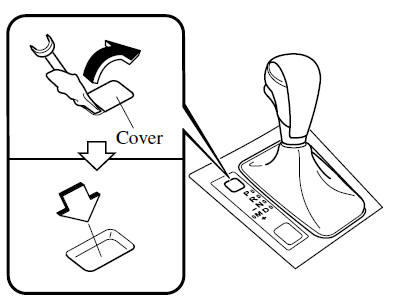
3. Press and hold the lock-release button.
4. Move the selector lever.
Take the vehicle to an Authorized Mazda Dealer to have the system checked.
 Shift-Lock System
The shift-lock system prevents shifting out of P unless the brake pedal is depressed.
To shift from P:
1. Depress and hold the brake pedal.
2. Start the engine.
3. Press and hold the lock-release ...
 Transaxle Ranges
The shift position indicator light in the instrument cluster illuminates.
The selector lever must be in P or N to operate the starter.
P (Park)
P locks the transaxle and prevents the front wh ...
Other materials:
Mazda 6 Owners Manual: Indication on Display
The Distance Recognition Support System (DRSS) operation status is indicated
in the active driving display or multi-information display. Regarding malfunctions,
check the vehicle conditions or have it inspected by an Authorized Mazda Dealer
according to the content of the displayed message.
R ...
Mazda 6 Owners Manual: Rear washer nozzle removal/installation
1. Disconnect the negative battery cable.
2. Remove the liftgate upper trim. (See LIFTGATE UPPER TRIM
REMOVAL/INSTALLATION)
3. Remove the rear washer hose from the rear washer nozzle.
4. Compress the tabs of the rear washer nozzle.
5. Pull the rear washer nozzle out to remove it.
6. Install ...