
Mazda 6 Service Manual: Dtc table
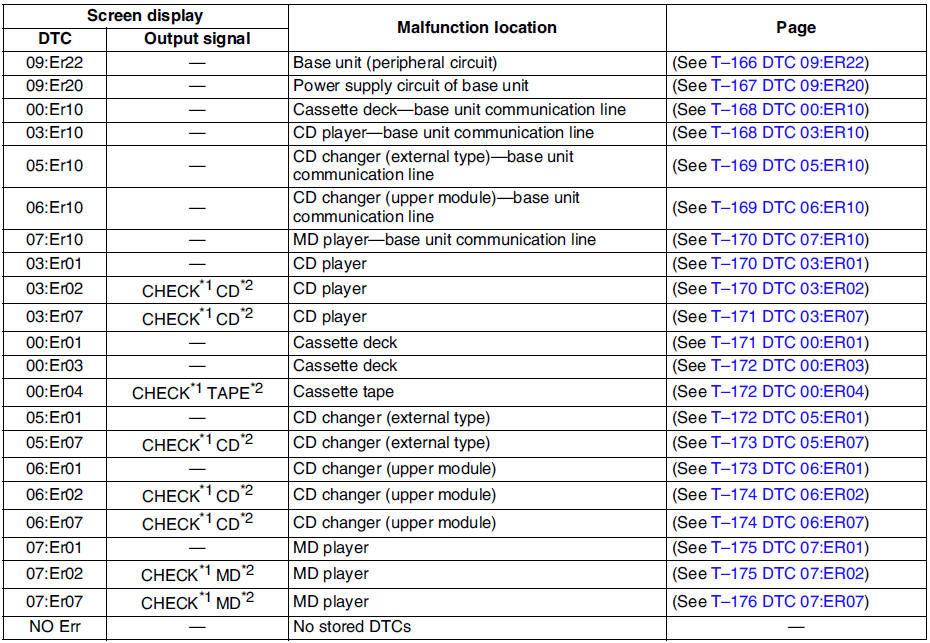
*1,*2 : When an error occurs, the error messages are displayed three times in the order of *1 and *2, respectively.
 Dtc clearing procedure
1. Start the on-board diagnostic test mode.
2. First press the POWER button, then simultaneously press AUDIO CONT button
for 2 seconds or more.
Caution
Before clearing the DTCs, be sure to ...
 Dtc 09:er22
Diagnostic procedure
...
Other materials:
Mazda 6 Service Manual: Child-Restraint System Types
In this owner's manual, explanation of child-restraint systems is provided for the following three types of popular childrestraint systems: infant seat, child seat, booster seat.
NOTE
Installation position is determined by the type of child-restraint system. Always read the manufacturer' ...
Mazda 6 Service Manual: Intake-air system removal/installation
Warning
When the engine and intake-air system are hot, they can badly
burn. Turn off the engine and wait until they are cool before removing the
intake-air system.
Fuel vapor is hazardous. It can easily ignite, causing serious
injury and damage. Always keep sparks and flames away from ...